Skip to content
Solibri WebChecker (Beta)

Check BIM models from anywhere with Solibri WebChecker

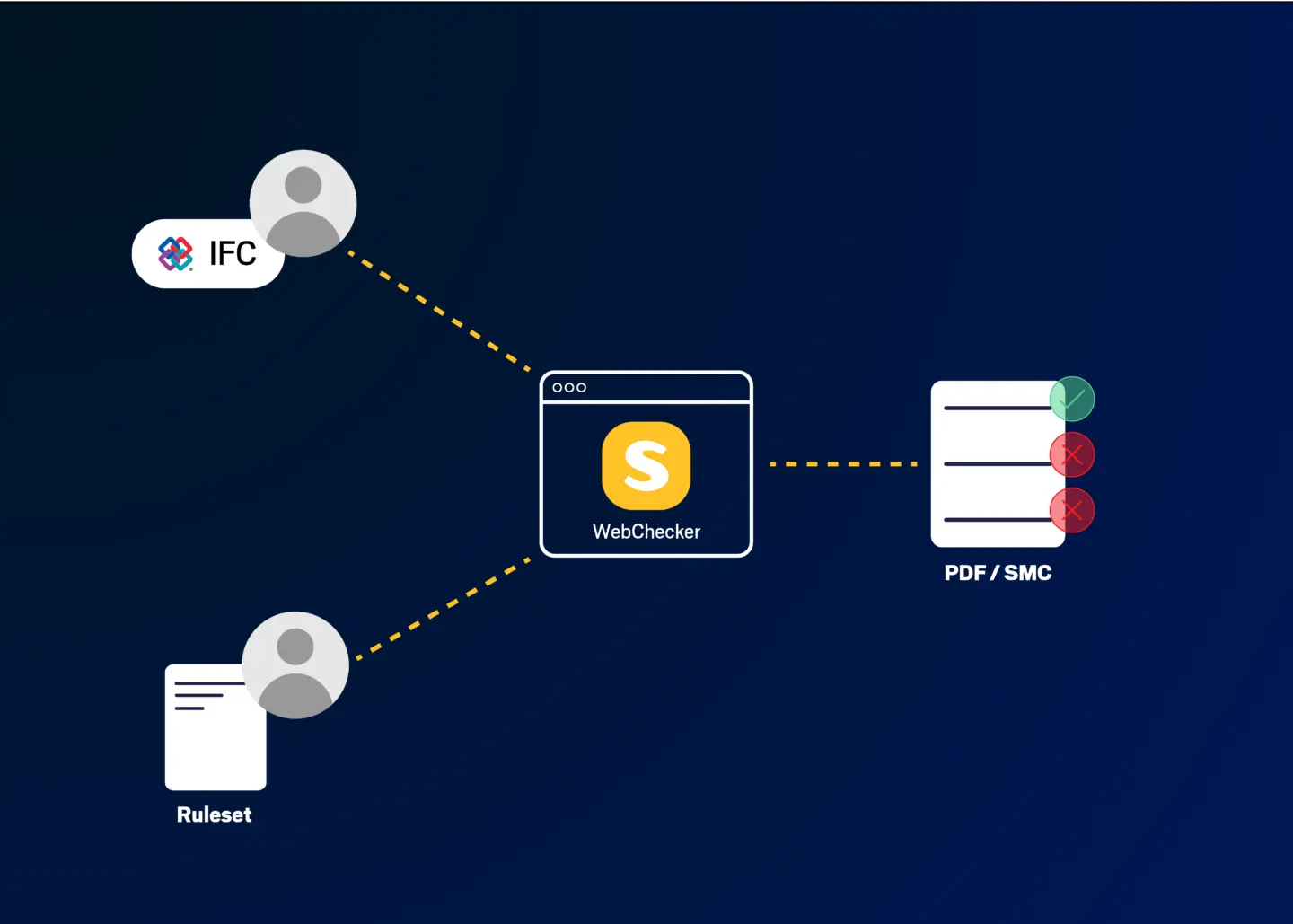
Solibri WebChecker brings Solibri's rules-based checking engine to your browser. Users can upload an IFC model, run a quality check, and export findings as PDF or BCF without installing Solibri desktop application. Available in Solibri Advanced and Solibri Premium.

Solibri brand image 11 2

Validate models at every milestone, without the overhead

BIM quality checking happens at every project milestone: design submissions, coordination reviews, regulatory approvals, and construction handover. But the time and expertise required to run structured checks means quality gates are often skipped, delayed, or left to a single BIM manager to complete manually.

The result: issues accumulate across disciplines. Coordination problems that could have been resolved in the design phase surface during construction. Submission reviews get held up because models were not validated before they were sent.

WebChecker removes the overhead. Solibri users can open a browser, upload their IFC model, and receive structured, rule-based quality results in minutes. No software installation. No configuration. No waiting for a specialist to run the check. Quality assurance becomes a continuous part of every workflow, not a bottleneck at the end of it.

I Stock 2223410802 1 1

What is Solibri WebChecker

Solibri WebChecker is a browser-based model validation service that runs Solibri's rules-based checking engine online. Solibri users upload IFC models, run checks using either a predefined Model Health ruleset or custom rulesets prepared by the BIM team, and review results interactively in the browser, including visual previews of each issue.

WebChecker is accessed with the same Solibri ID used for other Solibri cloud services. No desktop installation is required. The service is available worldwide. Users select their preferred data residency during project setup: EU at webchecker.solibri.com or US at us.webchecker.solibri.com.

WebChecker is available in 

  • Solibri Advanced
  • Solibri Premium

It is designed for two audiences: project participants who need to check models at milestones without Solibri desktop application, and BIM managers who want to make the organization's checking standards available to the wider project team.

Quality checking built for every project participant

WebChecker is not a standalone product. It extends rules-based checking engine and ruleset infrastructure that Solibri Advanced and Premium are built around, and delivers those capabilities through a browser rather than a desktop installation.

For organizations using Solibri Advanced, WebChecker supports a more repeatable approach to model checking. It gives BIM managers and project teams a lighter way to run supported Model Health and custom checks at key milestones, helping reduce the dependency on full desktop workflows for every validation task.

For organizations using Solibri Premium, WebChecker fits into a broader quality infrastructure. They often manage validation across multiple projects, disciplines, offices, or portfolios. In that context, browser-based checking helps increase checking capacity and supports more scalable quality control alongside Premium’s deeper governance, automation, integration, and enterprise validation capabilities.

Run a Model Health check in minutes

Every WebChecker project includes the Model Health check out of the box. This predefined ruleset, maintained and updated by Solibri, gives any team member an immediate, structured quality overview of their IFC model without any setup or configuration. Upload, run, review. That is the entire workflow.

The Model Health check covers the quality issues that slow projects down most: missing component names and identifiers that make elements impossible to cross-reference; incorrect IFC entity classifications that create coordination confusion; absent information properties such as fire ratings, IsExternal flags, and accessibility designations; and hard geometric clashes between disciplines that would otherwise only surface in a coordination meeting. Every check produces a clear, discipline-by-discipline issue report with 3D previews and exportable findings.

The practical outcome: 

  • Designers can validate their own models before submitting them. 
  • Project managers can confirm model quality before milestone gates. 
  • BIM coordinators receive pre-checked models rather than discovering issues during the review. 
  • Time spent on rework drops. 
  • Coordination meetings focus on decisions, not on discovering problems that should have been caught earlier.

Each IFC file can be up to 5 GB. One or more files can be included in a single project check.

Keep quality consistent as checking moves to the browser

For organizations with established BIM quality standards, WebChecker helps bring familiar Solibri checking logic into a browser-based workflow. A BIM manager can prepare a supported custom ruleset (.cset) in Solibri desktop application and use WebChecker to apply the same checking logic in a lighter, browser-based environment.

This is especially useful when users need a simpler way to check IFC models at key milestones. Instead of starting every validation process from a full desktop workflow, they can upload an IFC model, run a supported Model Health or custom check in the browser, and review structured results in minutes. This supports more repeatable model validation and helps organizations move toward consistent quality gates across projects.

WebChecker is currently in Beta, with project sharing and broader collaboration workflows planned for future releases.

WebChecker supports a wide range of rule templates, including intersection and clash rules, property validation, space analysis, IDS information delivery checks, and accessibility rules. A full list of supported templates is available in the Solibri Help Center.

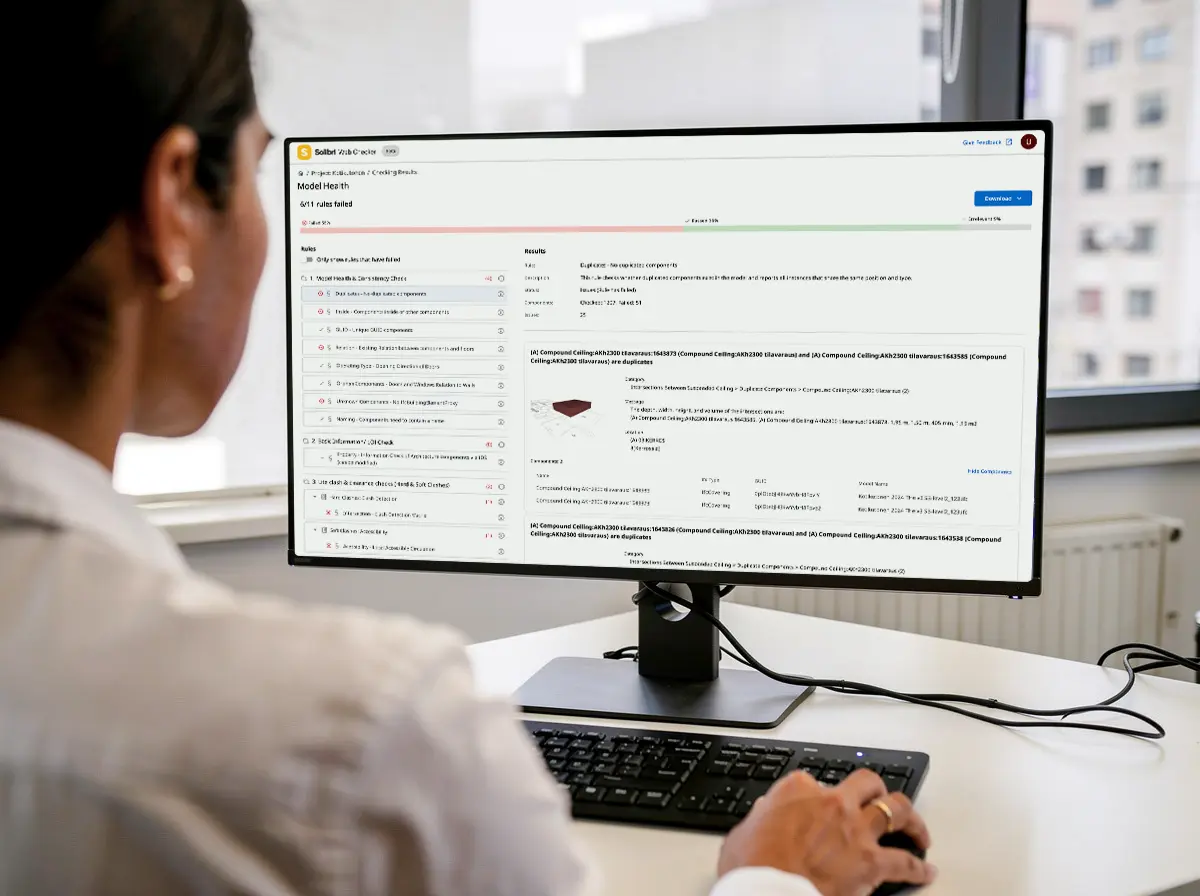
Solibri Web Checker screen

From upload to actionable findings in minutes

When a check is complete, WebChecker presents results in a structured, interactive view designed for fast review and immediate action. There is no need to open a separate tool or wait for a specialist to interpret the output.

Rules are organized by chapter and group, each showing a clear pass, fail, or not-checked status. Filtering to failed rules focuses attention on what needs to be resolved. Selecting a failed rule shows a full summary: what was checked, how many components were evaluated, how many failed, and the total number of issues detected. Each issue card shows the affected elements with measured values and a 3D preview of the exact problem location, so any team member can understand the issue without needing BIM expertise to interpret a raw data export.

From the same view, findings can be shared immediately. PDF reports provide a printable summary ready for milestone documentation, client review, or regulatory submission. BCF files export issues in open standard format, compatible with all major CDEs and BIM coordination tools. The BCF version is configured per project (1.0, 2.0, 2.1, or 3.0) to match the receiving platform. WebChecker users can also download results as an SMC file and open them in Solibri desktop application for deeper analysis, reclassification, or combined local and cloud workflows.

All results and exports are available for 30 days from the date of the check. Export and save results before the retention period ends.

Web Checker v2 Conceptual Diagram 300x

Scale your capacity with Solibri Tokens

WebChecker uses a token consumption model. Tokens are deducted only when a check completes successfully. A failed or incomplete check does not consume tokens. This means your organization pays only for the quality checks that deliver results.

Each Solibri Advanced and Solibri Premium plan includes a starting allocation of tokens that renews with your plan.

1 WebChecker check = 50 tokens

Included with your plan:

  • Solibri Advanced: 1,750 tokens per year, ~35 checks
  • Solibri Premium: 17,500 tokens per year, ~350 checks

Tokens are shared across your organization and apply across all Solibri token-powered features. If you need more capacity, additional tokens are available for purchase.

Need more checks? Buy tokens in advance.

Token packages

Add extra automation capacity with prepaid token packages.

Small

For occasional extra usage.
5,000 tokens
$250 $0.05 per token

Medium

For recurring project reviews.
10,000 tokens
$450 $0.045 per token

Large

Best value for frequent usage.
25,000 tokens
$750 $0.03 per token

Solibri product fit for automated workflows

Advanced

For BIM managers and project teams that want to extend structured model checking to every project participant without requiring additional Solibri Desktop licenses. Solibri Advanced includes WebChecker alongside full rule-based model checking, clash detection, data validation, BCF export, ITO reporting, and system integrations. Includes 1,750 tokens per year.

Premium

For organizations managing BIM quality at portfolio scale, with higher checking capacity and governance needs across multiple projects, teams, or regions. Solibri Premium includes WebChecker for browser-based model validation, custom ruleset checking, PDF and BCF export, and SMC download for continuing results in Solibri desktop application. Includes 17,500 tokens per year.

Frequently asked questions

Solibri WebChecker is a browser-based model validation service that runs Solibri's rules-based checking engine online. Project participants upload IFC models, run Model Health checks or custom rulesets, and review results with 3D issue previews, without installing Solibri desktop application. WebChecker is available in Solibri Advanced and Solibri Premium.

Solibri WebChecker is available in Solibri Advanced and Solibri Premium. It is not available in Solibri Starter, Solibri Essential, or Solibri Security+. Advanced and Premium differ in capability: Premium users can download SMC files to continue investigation in Solibri desktop application. Advanced users can run Model Health checks and custom rulesets but do not have SMC download.

No. WebChecker runs entirely in your browser and requires no software installation. It is accessed using your existing Solibri ID, the same login used for other Solibri desktop and cloud services.

WebChecker validates IFC models. You can upload one or more IFC files to a project check. Each file can be up to 5 GB. Results can be exported as PDF reports, BCF files, and for Premium users, as SMC files for opening in Solibri desktop application

The Model Health check is a predefined ruleset included in every WebChecker project, maintained and updated by Solibri. It covers model structure and entity classification, naming and identifier completeness, key information properties using IDS-based checks (including fire rating and IsExternal flags), and hard geometric clashes between disciplines. No ruleset setup is required to run the Model Health check.

Yes. Advanced and Premium users can upload custom rulesets (.cset) prepared in Solibri desktop application. A wide range of rule templates is supported, including intersection and clash rules, property validation, space analysis, IDS information delivery checks, and accessibility rules. The ruleset must contain only supported templates: rulesets that include unsupported templates may not run correctly. A full list of supported templates can be found in the Solibri Help Center.

The Model Health check runs with no setup and is maintained by Solibri. Custom checks use a .cset ruleset prepared by your BIM team in Solibri desktop application, reflecting your organization's specific standards. Both produce the same structured results view: rule-by-rule status, issue cards with 3D previews, and PDF or BCF exports.

Solibri desktop application is the full BIM quality assurance platform: it supports the complete rule library, advanced checking workflows, ITO quantity takeoff, presentation and reporting tools, and direct integration with CDEs and authoring tools. WebChecker brings Solibri's checking engine into a browser for project participants who need to validate IFC models at milestones without the full desktop environment. WebChecker users can download SMC results and open them in desktop application for deeper analysis.

Each check result is stored for 30 days from the date the check completed. This includes the interactive results view and all exported reports (PDF, BCF, SMC). After 30 days, the result and its reports are removed and cannot be restored. Export and save results before the retention period ends.

Solibri Tokens are the consumption unit used across Solibri's token-powered features. Each successful WebChecker check uses 50 tokens. Tokens are shared across your organization and are deducted only when a check completes successfully. Solibri Advanced includes 1,750 tokens per year and Solibri Premium includes 17,500 tokens per year, both renewing with your plan. Additional tokens can be purchased in packages of 5,000, 10,000, or 25,000.

Yes. Additional tokens are available for purchase from the Solibri Store in three packages: 5,000 tokens for EUR 250 (~100 WebChecker checks), 10,000 tokens for EUR 450 (~200 checks), and 25,000 tokens for EUR 750 (~500 checks). Purchased tokens are shared across your organization and apply to all token-powered Solibri features. Contact the Solibri team for regional pricing.

WebChecker is available worldwide. During project setup, you select your preferred data residency: EU data is stored at webchecker.solibri.com, US data at us.webchecker.solibri.com. Select the option that matches your organization's data residency requirements. WebChecker can also be accessed from Solibri Center under Products and Services.

WebChecker supports BCF 1.0, 2.0, 2.1, and 3.0. The BCF version is set per project in Project Settings. Select the version your CDE or issue management platform supports before running your first export.

Complimentary tokens included with your Solibri plan expire at the end of your contract term and do not roll over. The complimentary tokens balance will renew on your renewal date. Purchased tokens remain valid for 12 months from the date of purchase and are not affected by contract renewal.

Complimentary tokens are used before purchased tokens by default, so your included allocation is always consumed first.

Purchased tokens continue on their own 12-month validity from the date of purchase. Contract renewal creates a fresh complimentary token allocation without affecting any remaining purchased token balance.

Solibri WebChecker is available as a production service with a Beta label. Features, performance, and supported rulesets may evolve as the service matures.

Give your whole project team the ability to check models

Solibri WebChecker is included in Solibri Advanced and Solibri Premium. Talk to the Solibri team about making consistent model checking available to every participant on your projects.