Solibri Release Notes - September 2026
Release date: Tuesday 29.09.2026 16.00 EEST
Solibri 26.9.0 introduces Superrun, a new and intuitive way to automate recurring workflows and give your team more time for the decisions that move projects forward. Its visual, drag-and-drop interface makes automation easy to set up, reuse, and share across projects and teams.
The release also improves how rule results are visualized and introduces more precise controls for accessibility, property, collision, and free-space checks. Additional improvements to IFC spatial-zone support, authentication, search, classifications, 3D performance, and usability help you review models, coordinate information, and identify issues more efficiently.
Explore the release content below.
New features
Superrun
Introducing Superrun, a new and intuitive way to automate processes directly within Solibri’s desktop interface. Build the workflow you want to automate, specify the required details and parameters, and save it for yourself or others in your organization.
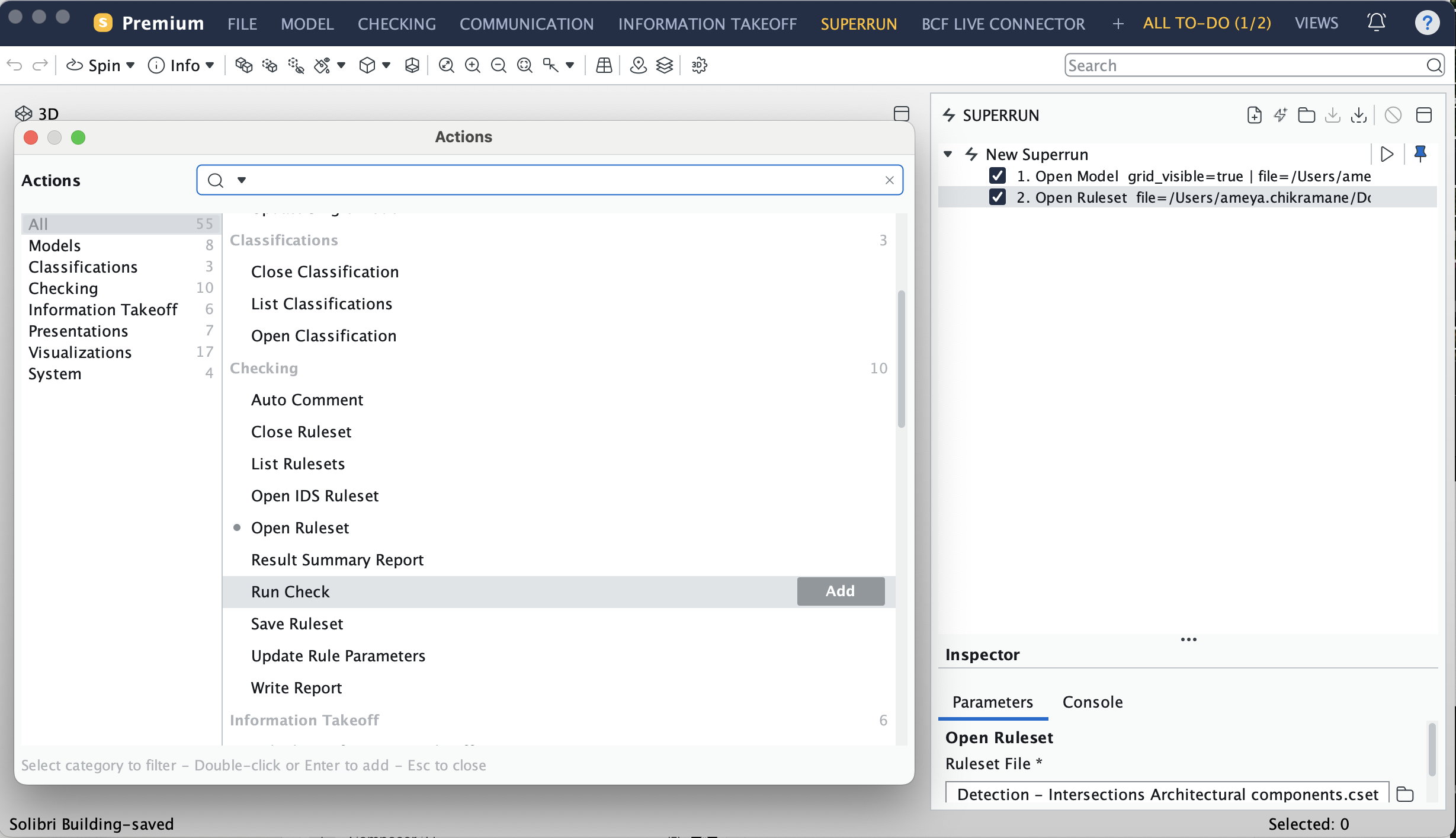
Automate the actions you repeat most often in one guided workflow. You can combine actions such as opening models, loading rulesets, running checks, creating presentations, taking snapshots, exporting BCF and Excel reports, and saving projects.
Arrange the actions in the order you need, validate the setup, and follow the progress of each action as the workflow runs. Save the workflow as a .superrun file to reuse it across projects or share it with colleagues. This helps teams follow the same process without rebuilding it each time.
Like Autorun, Superrun reduces repetitive manual work and supports more consistent workflow execution. The key difference is the user experience. Autorun is designed for fixed, scheduled XML pipelines that run without user interaction. Superrun provides a visual, guided experience for building, validating, refining, and sharing workflows directly in Solibri.
Superrun is available with Solibri Premium. Each execution uses 300 Solibri Tokens.
Rule improvements
Result-related component visualization
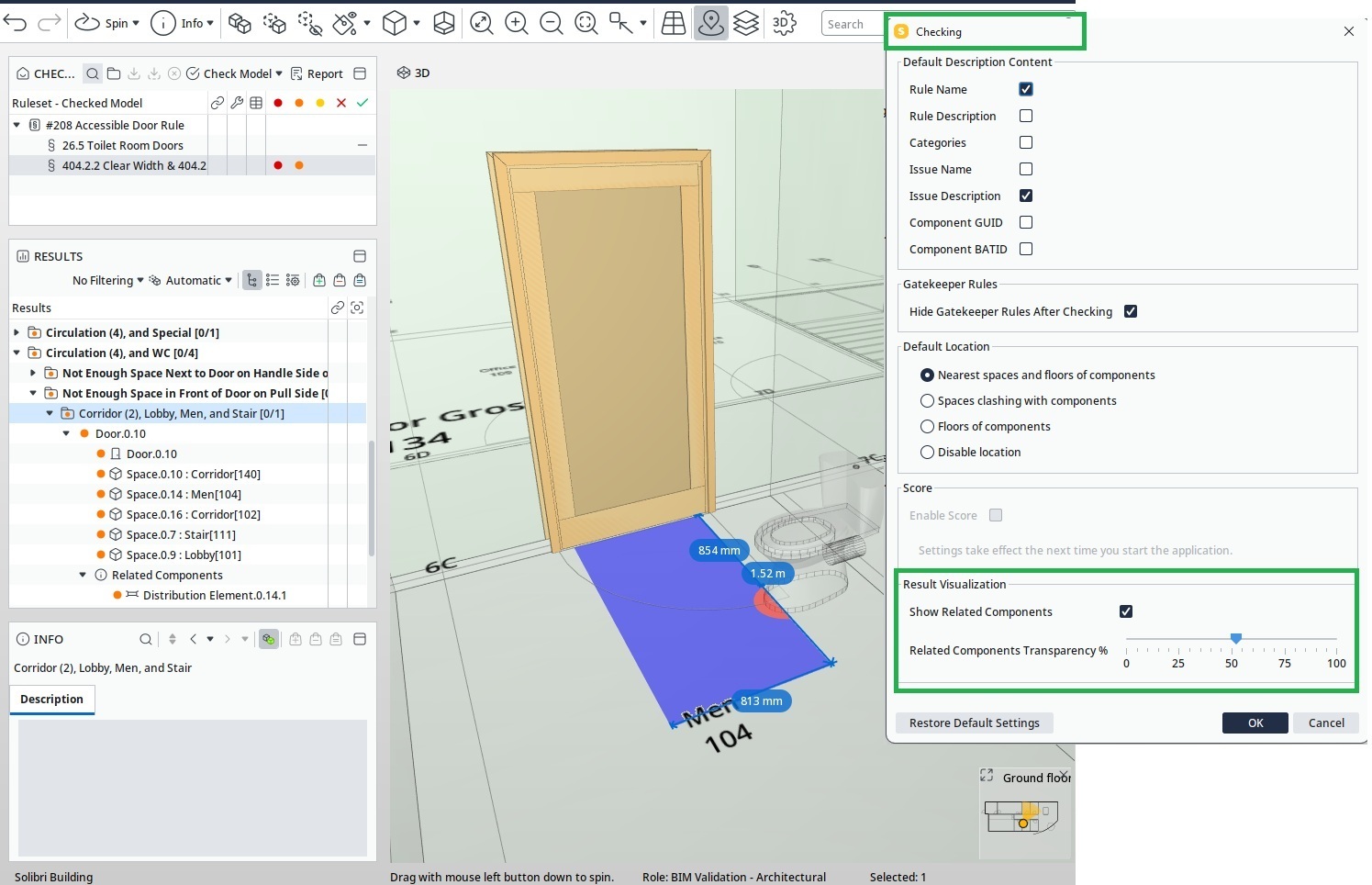
Related component visualization has a new global setting called Show Related components, which is located in File → Settings → Checking. When activated, related components are automatically shown with the configured transparency in issue visualizations that contain them. This gives you more context when reviewing an issue and makes the relationship between affected components easier to understand. In the example below, the sanitary terminals are information components.
Footprint calculations
Footprint calculations are now more accurate for larger boundary-representation geometries, providing more reliable results when checking complex components.
Accessible Ramp and Accessible Stair rules (#207, #210)
The Accessible Ramp and Accessible Stair rules now provide improved visualization of landing-area requirements, including intermediate landings for ramps.
Learn more about the Accessible Ramp rule and Accessible Stair rule.
Accessible Door rule (#208)
This release provides more control over door clearance and free-space checks:
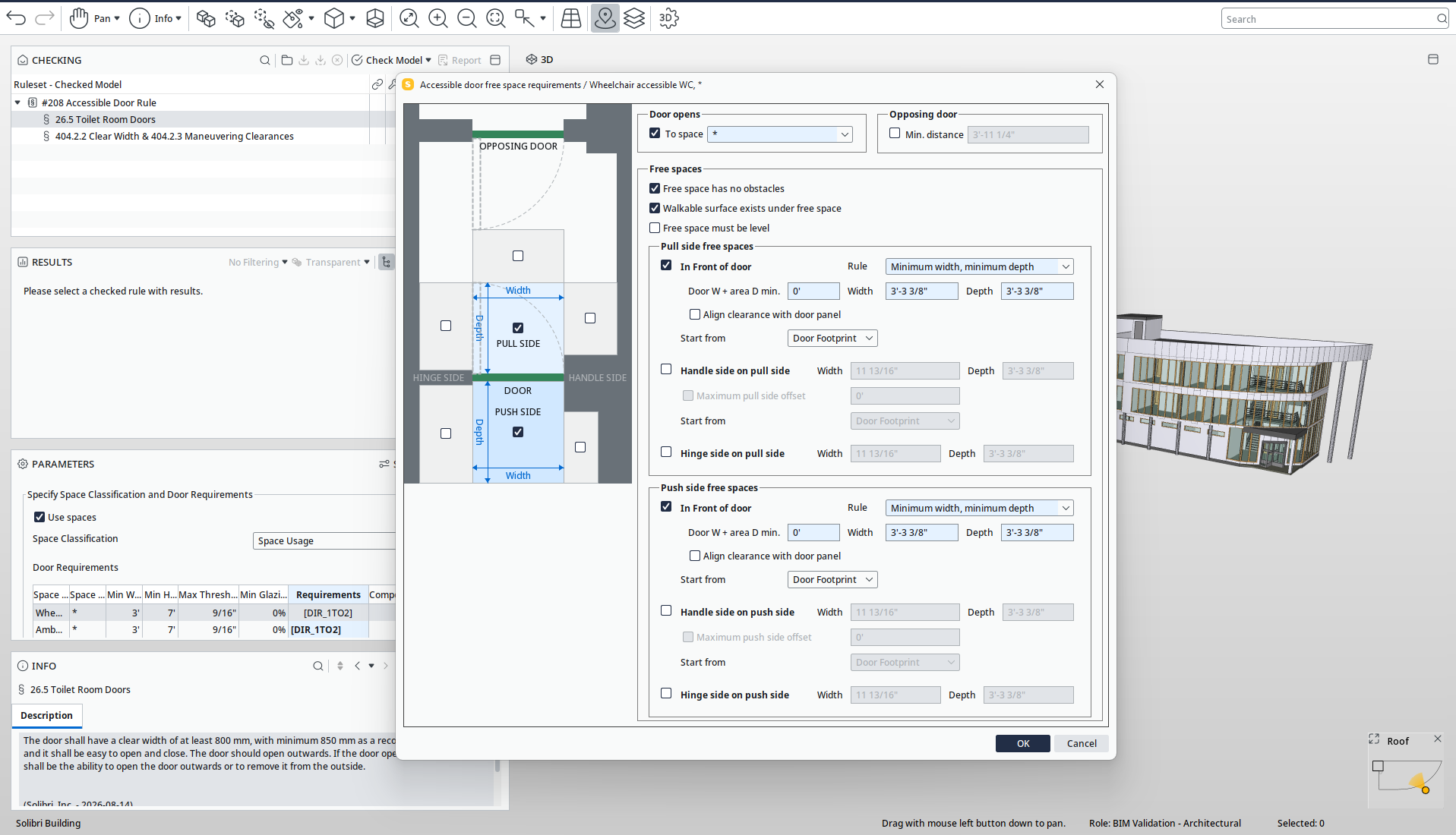
- Front and back clearances are now aligned with the door panel while remaining within the clear width of the door.
- You can optionally define a clearance offset from the panel surface for front and back clearance.
Tolerance for free-space checks
- Added a small implicit tolerance to free-space checks to prevent meaningless results that are difficult to see in the visualization.
Use spaces / pure door check
- You can now fully ignore adjacent spaces by turning Use spaces off. This turns Rule #208 into a pure door check with no reliance on surrounding spaces.
Independent free-space check kinds
- Previously, free-space requirement checking always combined obstacles in the free space and missing slab, or walkable surface, under the free space.
- You can now choose which kind of check is performed independently in the requirement panel.
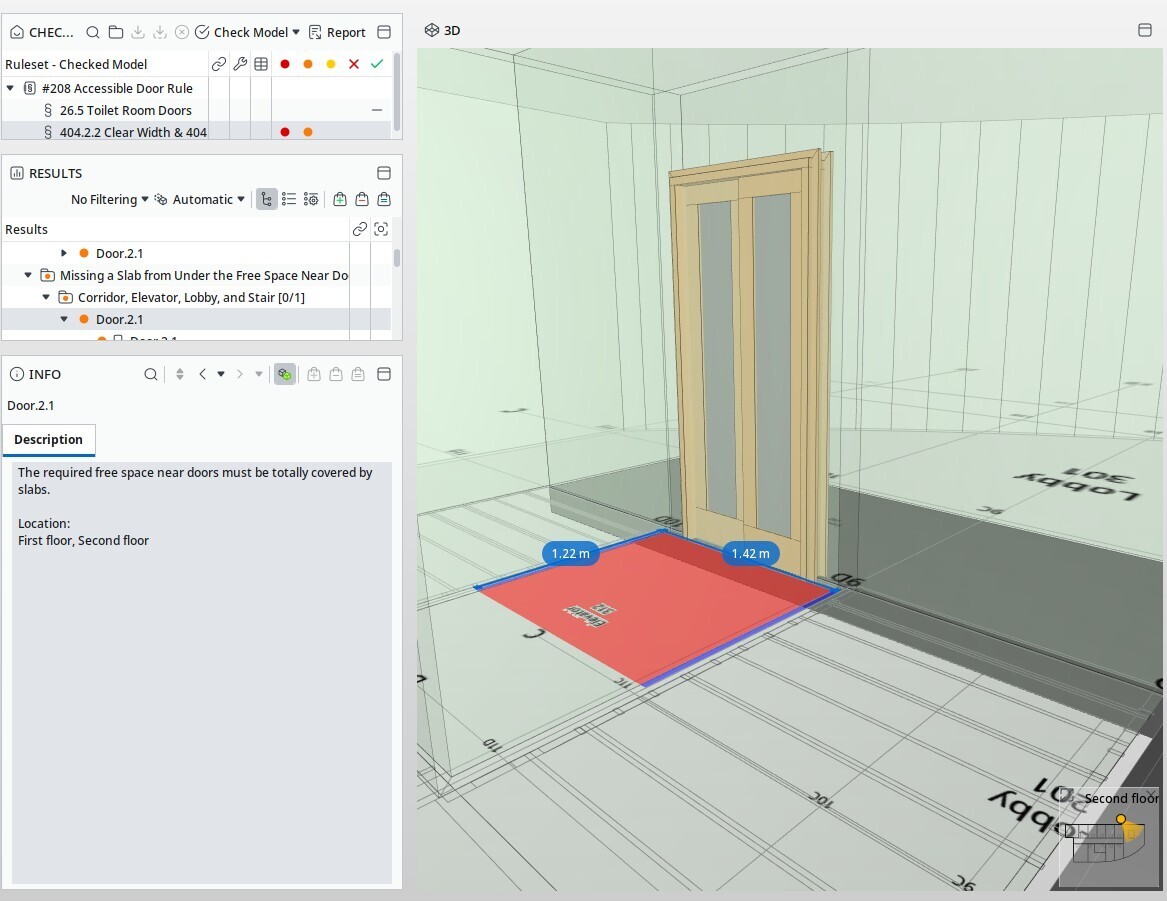
Walkable surface visualization
- Improved visualization for missing slab or walkable surface. Missing parts are shown in red.
Level free-space check
- Added a third kind of free-space requirement that checks whether the free space is level.
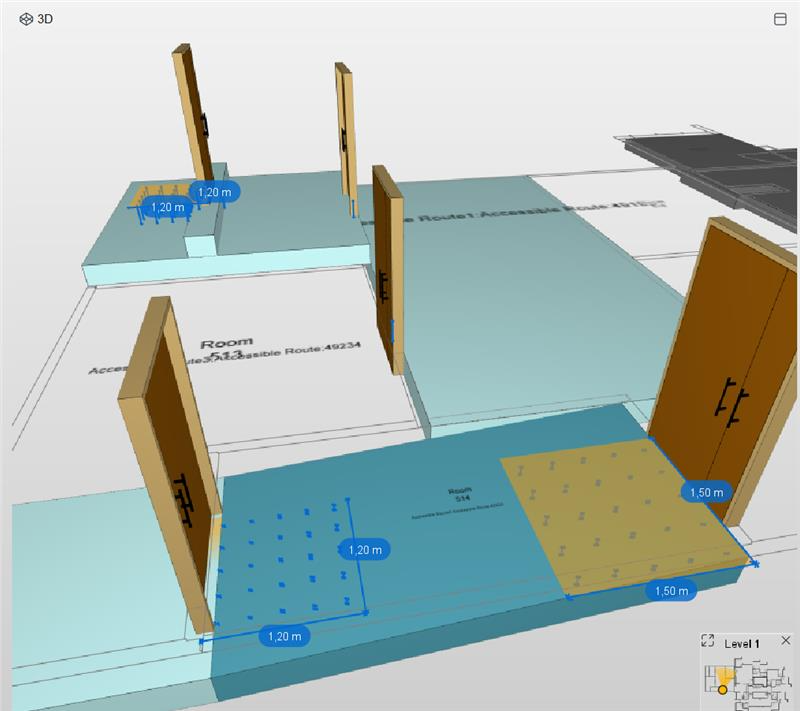
Learn more about the Accessible Door rule.
Property rule (#230)
Checks can now distinguish between a property that is completely missing and a property that exists but has an empty value. This helps you identify the precise cause of incomplete model information.
Learn more about the Property Rule Template with Component Filters.
Accessible Area around Objects rule (#248)
The following improvements give you more control over how clearance is checked around components:
- You can now choose whether door swings should be treated as obstacles.
- The advanced protrusion check is now hidden by default to simplify rule configuration.
- Fixed an issue where a space filter could still check components outside the target space if the component was near the space and not contained in another space.
- The space filter now verifies that the component is geometrically inside the target space instead of relying on the nearest space.
Learn more about the Accessible Area around Objects rule.
General Intersection rule (#1)
You can now choose whether clashes with protruding parts of openings are ignored. Previously, the rule always attempted to ignore these clashes. When this option is disabled, openings are treated like any other component.
Learn more about the General Intersection rule.
Component Inside Component rule (#234)
Result surface visualization now uses the configured source color with the existing transparency, matching the rule settings.
Learn more about the Component Inside Component rule.
Improvements to existing features
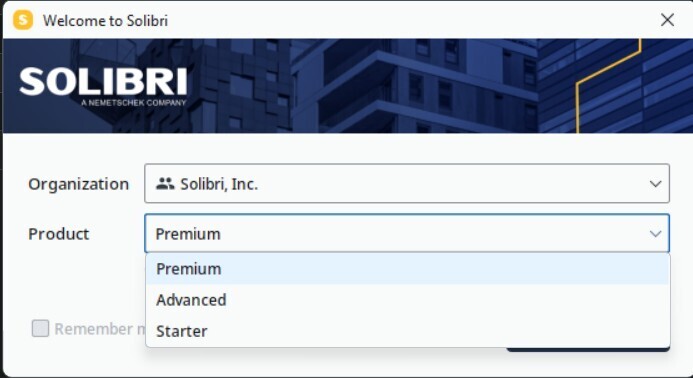
We are reintroducing product selection for tiered products. When you log in, you can now choose the product you want to use from the products assigned to you in Solibri Center, giving you more control over the features and license you use for each session. Your administrator can enable or disable product selection in Solibri Center.
Custom Results
Custom Results lets you adapt the titles, descriptions, and categories of checking findings to match your project, client, or authority requirements without changing the rule itself. This helps teams communicate issues consistently across checking results, presentations, and exports.
What changed in this update:
- Customized titles and descriptions are now applied when you run a check and remain part of the checking results.
- Previously, customizations could be shown as a temporary “overlay” on top of the original results. That approach was removed because it was harder to keep in sync with exports, slides, and other views.
- If you open an older .smc or .cset file that still used the previous overlay style, Solibri migrates it automatically so your customizations continue to work.
- After you update customizations, the related rules are marked as needing a re-check before the new wording appears in results.
AI Assistant: at-lookup
- The AI Assistant now supports at-lookup (@), so you can reference relevant context while chatting, for example, project or model-related items available to the chatbot.
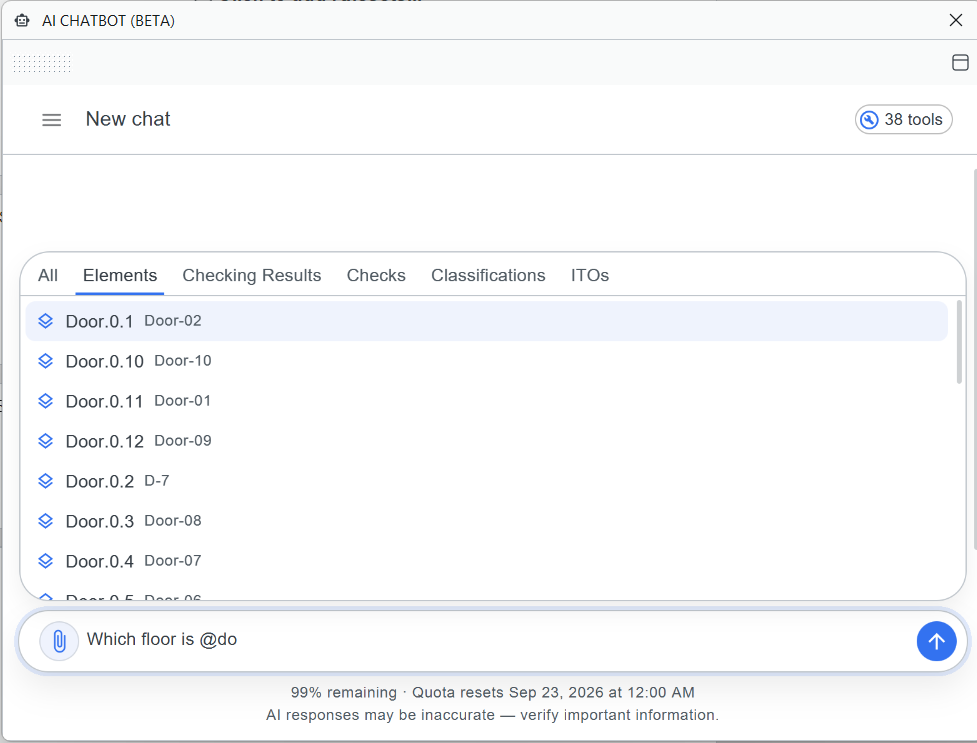
Learn more about the Solibri AI-powered Assistant.
IFC
Solibri includes several improvements to IFC import, mapping, geometry, units, and display.
- Solibri now supports IFC spatial zones connected through the dedicated spatial-structure reference relationship. This makes spatial zones and their referenced spaces available more reliably in the Relations tab, Quantity Takeoff, and other workflows, including workflows using IFC exported from Archicad. You can also choose to show spatial zones directly in the 3D view, making it easier to review and use zone-based model information.
Autodesk Forma
- Autodesk Forma integrations now support PKCE-based OAuth authentication. This modern authentication approach improves alignment with enterprise security requirements when connecting to Autodesk hubs.
- The Forma Issues integration now includes a dedicated Watchers field, making it easier to see who is following an issue.
Classifications
- You can now drag classification rows directly into Filter and Information Takeoff definitions. This makes it faster to reuse existing classification structures when defining filters and quantities.
- You can automatically assign colors to classification rows, making classifications easier to set up.
Selection Basket visualization
The Selection Basket now updates the 3D visualization whenever the selection changes, helping you immediately see the components currently included in your basket.
Legacy Excel export
Support for the legacy Excel .xls export format has been restored where it was previously unavailable.
Search
We’ve significantly improved search across Solibri. You can now search in locations such as Info View and Classifications, making it easier to find the information you need. Search bars are also now available consistently across Solibri panels.
Custom disciplines
Custom discipline icon-text validation is now less restrictive.
Information Takeoff
Information Takeoff now shows a tooltip containing the column name and letter. The column letter is also displayed in the title of the edit dialog, making columns easier to identify when configuring or reviewing a takeoff.
User interface and workflows
Several smaller improvements have been made across Solibri:
- Dropdown values are now sorted alphabetically
- The Import IDS File string is now translated into French.
- The Release Notes string is now translated in the installer.
- Section boxes behave more reliably around moving spaces.
- Sections can now be renamed.
- It is now possible to disable filling of space sections under Sectioning settings.
- It is now possible to measure distances by clicking Point clouds.
Performance
We’ve made further improvements to 3D handling and visualization. Solibri now provides a more responsive experience when working with complex models, especially those containing multiple grids, text elements, and markups.
Additional performance improvements include:
- 3D rendering frame rate has been improved by 50–100%.
- A performance regression when selecting rules in the Checking view has been fixed.
- Grid text elements no longer consume excessive memory.
Security
We have improved security to comply with the following vulnerability and hardening requirements:
- Removed an unnecessary call to an IP-address endpoint.
- Added PKCE-based OAuth authentication support for Autodesk Forma and Autodesk Construction Cloud integrations.
- Updated to JDK 21.0.12 with the latest Java security fixes.
- Updated Spring components to address known security vulnerabilities.
Bug fixes
-
- Filtering results by severity symbol no longer causes Solibri to become unresponsive.
- Issue severity is now shown correctly in Issue Details when a slide is added at component level.
- Rule #1: General Intersection: Inconsistencies in reporting clashes involving vertical openings, such as slab openings, have been resolved.
- Rule #207: Accessible Ramp: Inconsistent height values are no longer reported for identical kerb ramps.
- Rule #208: Door Clearance: Maximum threshold calculations have been corrected for doors leading to inclined ramps, and visualizations are now clearer when a door exceeds the maximum threshold.
- Rule #222: Component Distance: Component distance calculations have been corrected for horizontal distances between footprints.
- Rule #245: Clash Detection Matrix (CDM): Severity coloring is now exported reliably to Excel.
- Rule #245: Clash Detection Matrix (CDM): An issue that could leave the Parameters view empty after importing a component set has been fixed.
-
- Point clouds located far from the model origin now zoom correctly when opening an .smc model.
- A rotation issue with Move or Rotate dialog when used in Finnish has been resolved.
- IFC4 visualization of downward extrusions has been corrected.
- Decomposed slab geometry is now displayed correctly.
- Site coordinates are now handled correctly when the site has geometry.
- IFC2x3 distribution elements are now mapped correctly to Solibri component classes.
- IfcSystemFurnitureElement is now mapped correctly to SystemFurnitureElement
- Support for property-assigned units has now been implemented.
- Revit ceiling grid display has been corrected.
-
- Recent Files lists no longer reset after updating Solibri.
- File size ballooning when working with specific rules like 171 has been reduced.
- Classification Settings correctly enables the Remove Column button when appropriate.
- Classification discipline values now translate when with Dutch.
- Custom discipline JSON export has been corrected.
- Discipline and color mapping changes are persisted after restart
- Duplicate display names in the Japanese Discipline field have been resolved.
- The Show Hyperlink tool has been restored in Hyperlink Manager.
- Save is no longer incorrectly enabled when adding a section plane.
- SharePoint integration now lists sites attached to Microsoft 365 groups.
- Setting user profile via profile.ini is now correctly respecting privileges.
- BCF Live Sync failed messaging has been improved to be more specific.
Release content availability across products and plans
After the launch of Solibri on April 13, the new features are only available in the new products and plans (Starter, Essential, Advanced, Premium), while updates to existing features, performance, and security improvements are available for legacy products as well.
| Feature | Products & Plans |
| Superrun | Premium |
| Result Customization | Advanced, Premium, Security+, Enterprise |
| All rule updates | Advanced, Premium, Security+, Office, Enterprise |
| Autodesk Forma Issues integration | Advanced, Premium, Site, Office, Enterprise |
| Performance and security improvements | All products and subscriptions |
| Bug fixes | All products and subscriptions |