Solibri 26.9.1 Release notes
Release date: Tuesday, 17 November 2026, 16.30 EET
Solibri 26.9.1 brings security updates, performance improvements, and practical changes to everyday model checking workflows. You can now create and edit Superrun workflows with the AI Assistant, open large local point clouds faster, and use Color by Elevation to make height differences easier to see.
The release also adds SharePoint site selection by URL and support for offline Solibri Starter licensing, alongside fixes and usability improvements across checking rules, views, layouts, and integrations.
New Features
AI-assisted Superrun workflows
The AI Assistant in Solibri can now create and edit Superrun workflows from plain-language instructions. Describe the workflow you need, and the assistant builds or updates it for you.
The AI Assistant is built into your Solibri session and lets you use natural language to configure rules, navigate checking results, query model components, and work with issues. Superrun provides a visual way to build, run, and share reusable workflows for recurring tasks, such as opening models, running checks, creating presentations, and exporting reports. Together, they reduce the manual work involved in setting up repeatable checking workflows.
The AI Assistant is currently available in Beta with Solibri Premium. Superrun is also available with Solibri Premium.
Learn more about automated workflows in Solibri.
Licensing
- Solibri Starter now supports offline licensing. For more information, contact Solibri sales.
Point Clouds
- New Color by Elevation option colors the points of a point cloud by elevation, so monochrome point clouds are easier to read.
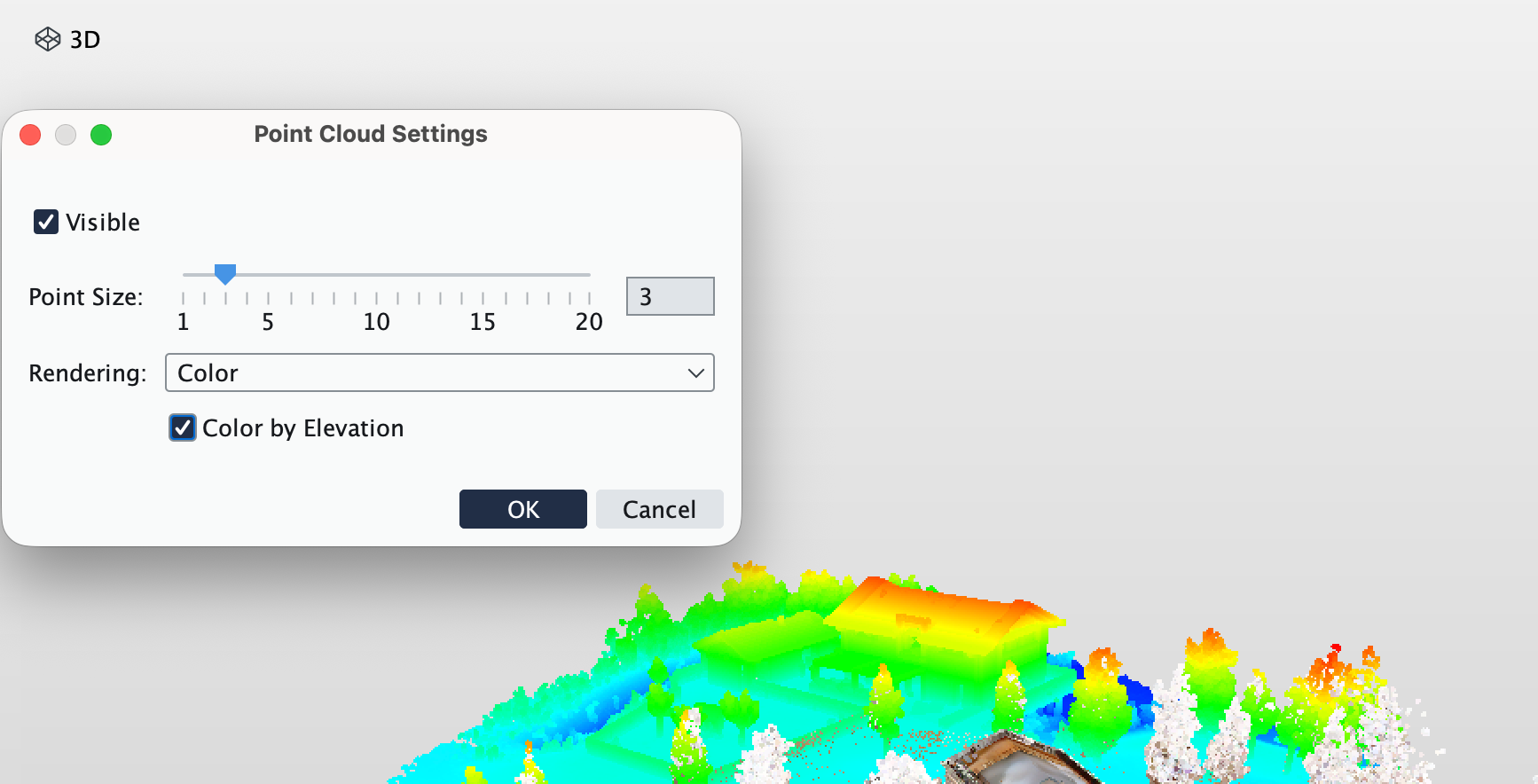
- Large local point cloud files (E57, LAS/LAZ) now open faster. Files are read directly from their original location instead of first being copied to a temporary file.
- Point clouds far from the project origin no longer jitter when the view is rotated. The 3D scene origin is now based on the point cloud location when the scene has no models.
- Point Cloud Clash (300), Clearance (301) and Matching (302) rules now return irrelevant with an explanatory message when the license does not include point clouds.
- Info view: the “IFC Header Properties” tab is renamed to “Other Properties” for point cloud models.
Rules improvements
- Rule 235: Fixed inconsistent counting.
- Components that are in both filters are no longer reported as info.
- Added a parameter to group by nearest spaces and a filter for near-space grouping.
- Rules 207 and 210: Fixed the handrail continuity logic.
- Rule 248: All obstacles are now shown when the space boundary is exceeded.
- Rule 234: The rule no longer resets its checking when locked.
- Nearest Space calculations now give reproducible results.
- Rule versions were updated for the fixes above.
- IDS (Rule 244): Models with no relevant components after pre-filtering are no longer reported as failures.
- Fixed an error when IDS specifications use patterns in property sets.
- The Open IDS File dialog now only shows valid .ids files.
Rulesets
- Ruleset library: the “Move up” / “Move down” (and Cut) actions, which did nothing outside editing mode, are now hidden when the Ruleset Manager is not in editing mode.
Checking Results and Custom Results
- A customized issue description now replaces the default description completely. No default info is appended, including for results from Autorun and Superrun.
- Custom Results: fixed the custom statuses dialog not opening when no model is open.
- Editing Custom Results now marks the project as modified.
- Issue Details: labels are shown with their full text, and the coordination label display is unified.
Integrations
SharePoint and OneDrive
- A SharePoint site can now be selected using its site URL, for organizations that do not allow site search. The integration requests the narrower Sites.Selected permission instead of Sites.Read.All.
- Updated the Microsoft Graph, MSAL4J and Azure Identity libraries.
Autodesk
- The Autodesk authentication message now mentions Autodesk Forma instead of only the outdated BIM360 name.
- Models in Forma/BIM360 folders with many files are no longer wrongly reported as “File not found” when updating.
General integrations improvements
- Cancelling the BCF server sign-in no longer reopens your browser.
- Selecting several BCF Live issues now shows “Multiple Values” correctly.
Bug fixes and other improvements
IDS
- Fixed an issue in which Solibri was not closing through Exit after importing an invalid IDS file. A failed IDS import no longer adds an empty ruleset, and the underlying XML parse error is now shown.
Views, Layouts and Usability
- Undocked views are always visible. If a stored undocked view position is outside all connected screens (for example after disconnecting a monitor), the view is moved back on screen when Solibri starts or a layout is restored.
- Clicking “Show Checked Components View” (and other View menu entries) focuses a view that is already open instead of undocking it.
- The “Update Model” button in the status bar stays enabled when switching between layouts.
- Fixed the File view left toolbar being centered, leaving empty areas, on screens with a different display scaling. It is now top-aligned.
- Long custom discipline names are truncated in the Set Discipline menu.
3D
- 3D canvas no longer blinks black when its size changes between layouts on slow GPUs. The last frame stays visible while resizing.
- “Section Above and Below Floor” planes are now visible for models far from the origin, such as georeferenced models.
- IFC and model updates: Component colors now update when you update a model.
- The sectioning tool chosen in the Sectioning view now matches the 3D toolbar.
- Changing measurement tools no longer flashes a blue border.
Performance and Stability
- Fixed a freeze when selecting a component while the Navigation Map is being updated.
- Fixed an error when opening the Save As dialog from checking.
- Fixed the ITO report failing with an error when an ITO column is missing.
- Fixed a deadlock in the Recent panel caused by the browser panel.
Geometry and 2D Calculations
- Fixed fragmented results in complex 2D area subtractions (for example in Accessible Space rules) with newer JDK 21 updates. The installer now ships a JDK build with the previous java.desktop AreaOp patched in.
API
- Improved the TriangleMesh.intersection() documentation (Society topic).
Classification:
- Selecting a component now shows only that component in the 3D view, so it’s clear what you’ve selected
- Resolved an issue where the ROUND formula rounded negative numbers incorrectly.
- Formulas: IF (and related functions) now short-circuit. Errors in the unused branch, such as division by zero, no longer break guarded formulas. This is also relevant for ITOs.
Communication:
- Comments are no longer lost when you switch viewpoints.
- The cursor no longer jumps to the end of the title or description while editing an issue.
- Import error dialogs now appear on the correct screen.
- BCF 3.0 reports: Solibri warns you when issue titles are missing before you create a report.
- BCF Live: Added tooltips to the viewpoint buttons in Live Issue Details.
Security
- Updated the JDK to 21.0.13 to remove the compromised eMudhra certificates (CVE-2026-91403). Solibri does not use these certificates, so no impact is expected.
- Updated the Microsoft Graph, MSAL4J and Azure Identity libraries.
- Updated jackson-core to 2.21.7, guava to 33.7.1-jre and nimbus-jose-jwt to 10.0.2 (dependency updates).
- Updated Apache Tomcat to 11.0.27, resolving CVE-2026-101296, CVE-2026-101356 and CVE-2026-103119.
Release content availability across products and plans
After the launch of Solibri on April 13, the new features are only available in the new products and plans (Starter, Essential, Advanced, Premium, Security+), while updates to existing features, performance, and security improvements are available for legacy products as well.
| Feature | Products & Plans |
| AI assistant, Superrun, PointCloud updates | Premium |
| Result Customization | Advanced, Premium, Security+, Enterprise |
| All rule updates | Advanced, Premium, Security+, Office, Enterprise |
| Autodesk Forma Issues integration | Advanced, Premium, Site, Office, Enterprise |
| Performance and security improvements | All products and subscriptions |
| Bug fixes | All products and subscriptions |