Solibri Release Notes - June 2026
Release date: Tuesday 30.06.2026 15.00 EEST
Following the launch of the new Solibri platform and product portfolio in April, this release brings new capabilities into the daily model checking workflow.
Solibri introduces the first step in integrating AI into model checking with an AI-powered assistant, now available in Beta in Solibri’s desktop environment. The release also expands point cloud model checking, making it easier to compare as-built conditions against design intent and identify deviations earlier.
Alongside these updates, this release includes new infrastructure workflows, custom disciplines, rule improvements, localization updates, security enhancements, and bug fixes across Solibri’s desktop and cloud environments.
Together, these updates support a more connected, reliable, and efficient quality assurance workflow for BIM and digital construction teams.
Desktop updates
The Solibri 26.6.0 desktop update brings new capabilities and improvements across model checking, infrastructure workflows, issue management, localization, and everyday usability.
Key updates include:
- AI-powered assistant (Beta): A natural-language assistant integrated into Solibri desktop environment that can guide users through workflows and support in-session actions on the open model, such as navigating results, querying components, and helping set up rules, run checks, and work with issues.
- Point cloud validation: Compare point cloud scans with model components to validate as-built conditions against design intent and identify deviations earlier.
- Infrastructure workflows: Use improved IfcAlignment support and new sectioning tools to review long, linear assets such as roads, rail, and bridges.
- Custom disciplines: Create and use your own discipline categories to better organize and filter project content.
- Issue management integrations: Use the improved Autodesk Forma Issues integration with bidirectional pushpin support, alongside new ACCA and KISS-BIM integrations for issue management workflows.
- Result customization and usability improvements: Tailor result messages to project terminology, use expanded localization and in-app notifications, and benefit from rule, performance, security, and usability improvements.
Explore the release content below.
-
AI-powered assistant (Beta)
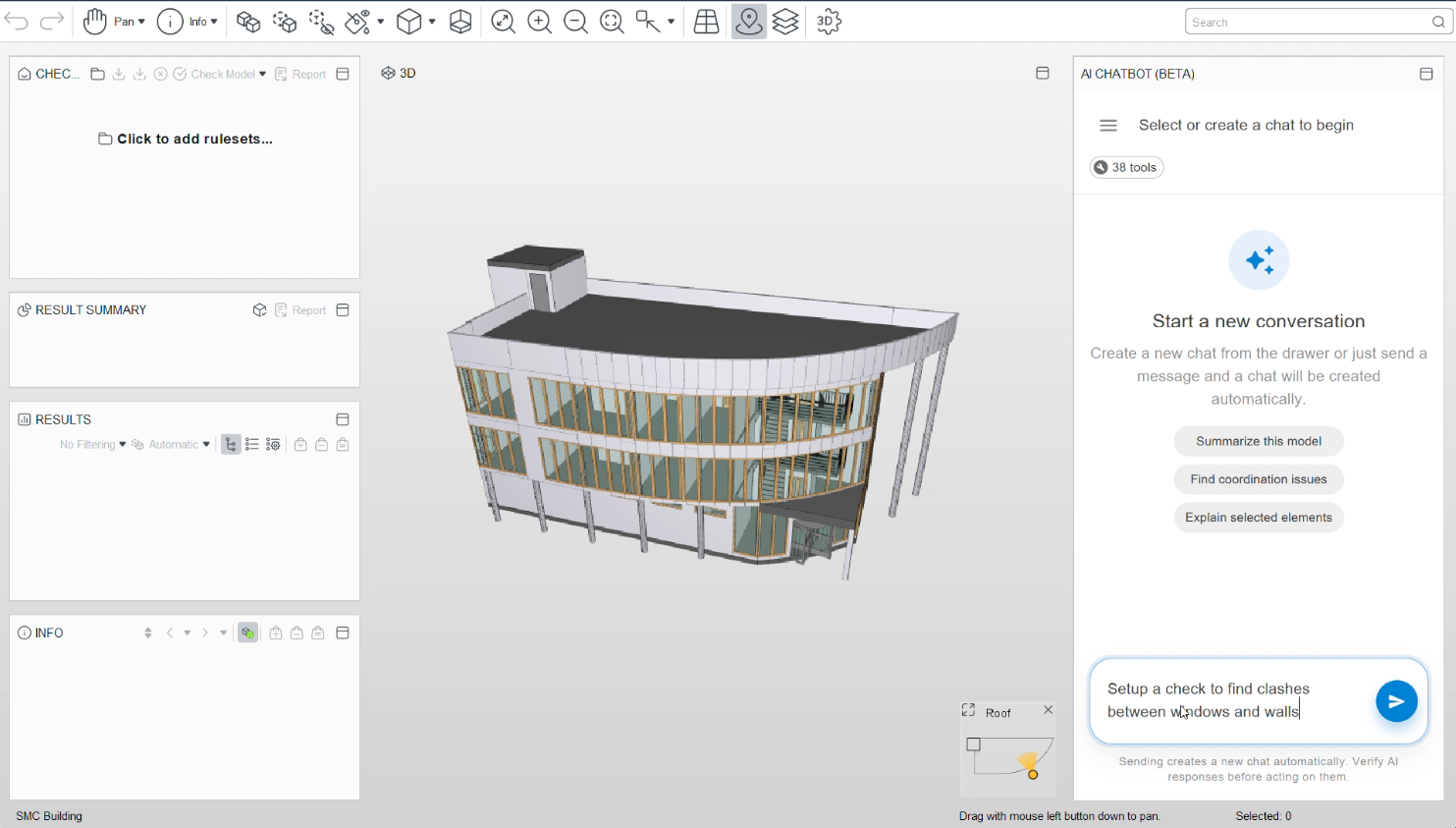
You can now interact with Solibri through a built-in AI-powered assistant. Ask questions in natural language, get help with Solibri workflows, and let the assistant support actions in your open model, such as navigating results, querying components, and working through checking tasks.
The assistant is built on Solibri’s AI infrastructure and connects to your current session through a curated set of tools. The tool set has been streamlined for reliability, so responses remain fast and dependable.
The AI assistant includes the following capabilities:
- Natural-language chat integrated into the Solibri desktop environment
- Model-aware assistance for your open project
- Support for setting up rules, running checks, and working with issues
- Optimized tool set designed for stable, predictable responses
The AI-powered assistant is available in Beta for Solibri Premium customers.
Use case: Ask the assistant how to configure a rule, then let it help you inspect components or results without switching between views and menus.
Learn more about the Solibri AI-powered assistant
Point Cloud checking
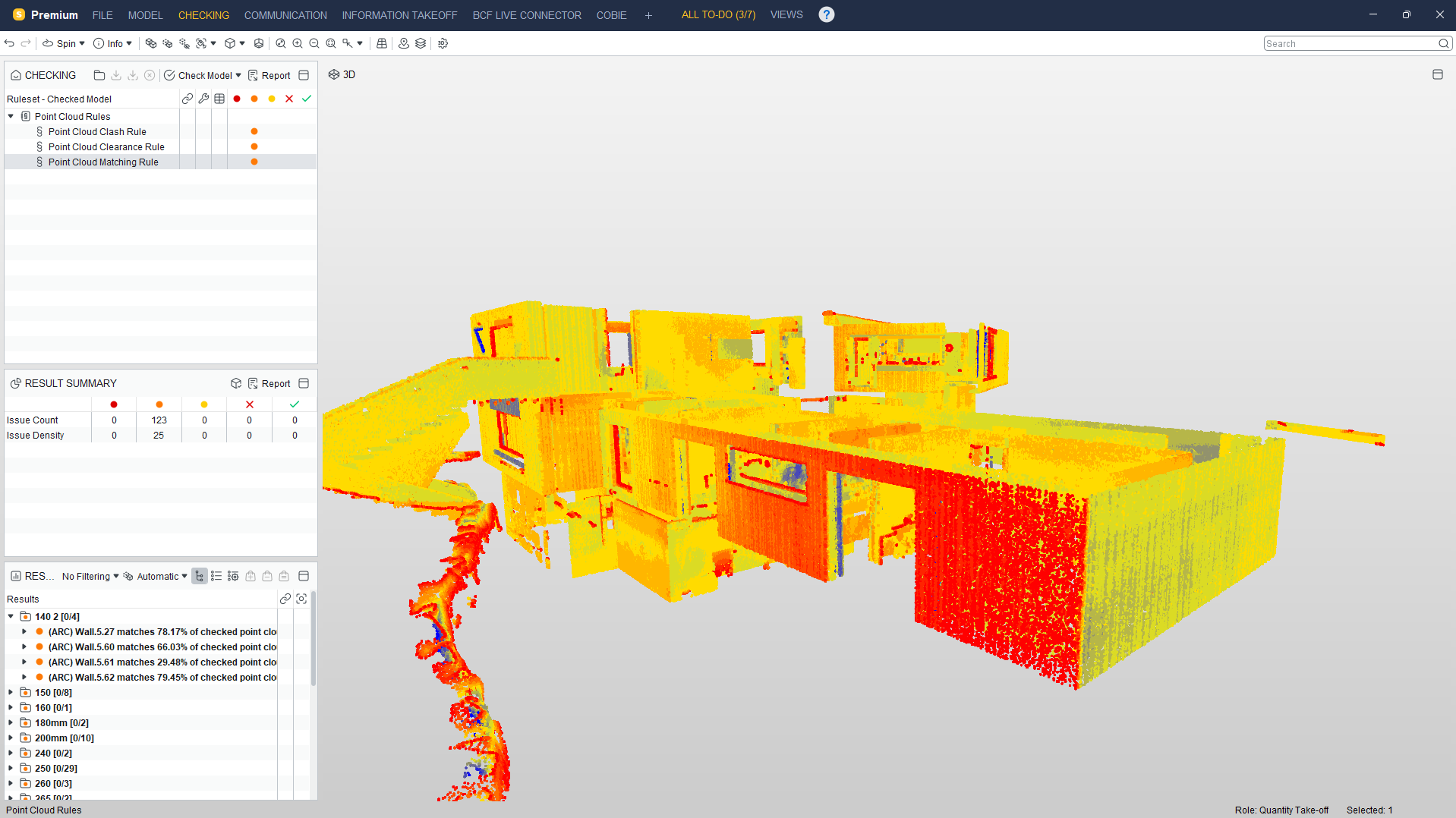
New point cloud rules make it possible to compare imported point cloud scans against model components, helping teams validate as-built conditions against design intent earlier in the workflow. The new rules cover clash checks, clearance checks, and matching checks for as-built versus as-designed comparisons.
- Point Cloud clash check reports components when scan points fall inside or near a component according to the configured clash tolerance.
- Point Cloud clearance check reports components when scan points fall inside a configured clearance range.
- Point Cloud matching check reports deviations between point cloud data and model components, including unmatched point data.
You can now import .las and .laz models in addition to .e57 point clouds. You also have more options to adjust point cloud settings during and after import.
Learn more about Point Cloud validation at Solibri
Point cloud support is available for Solibri Premium and Enterprise customers.
Custom Disciplines
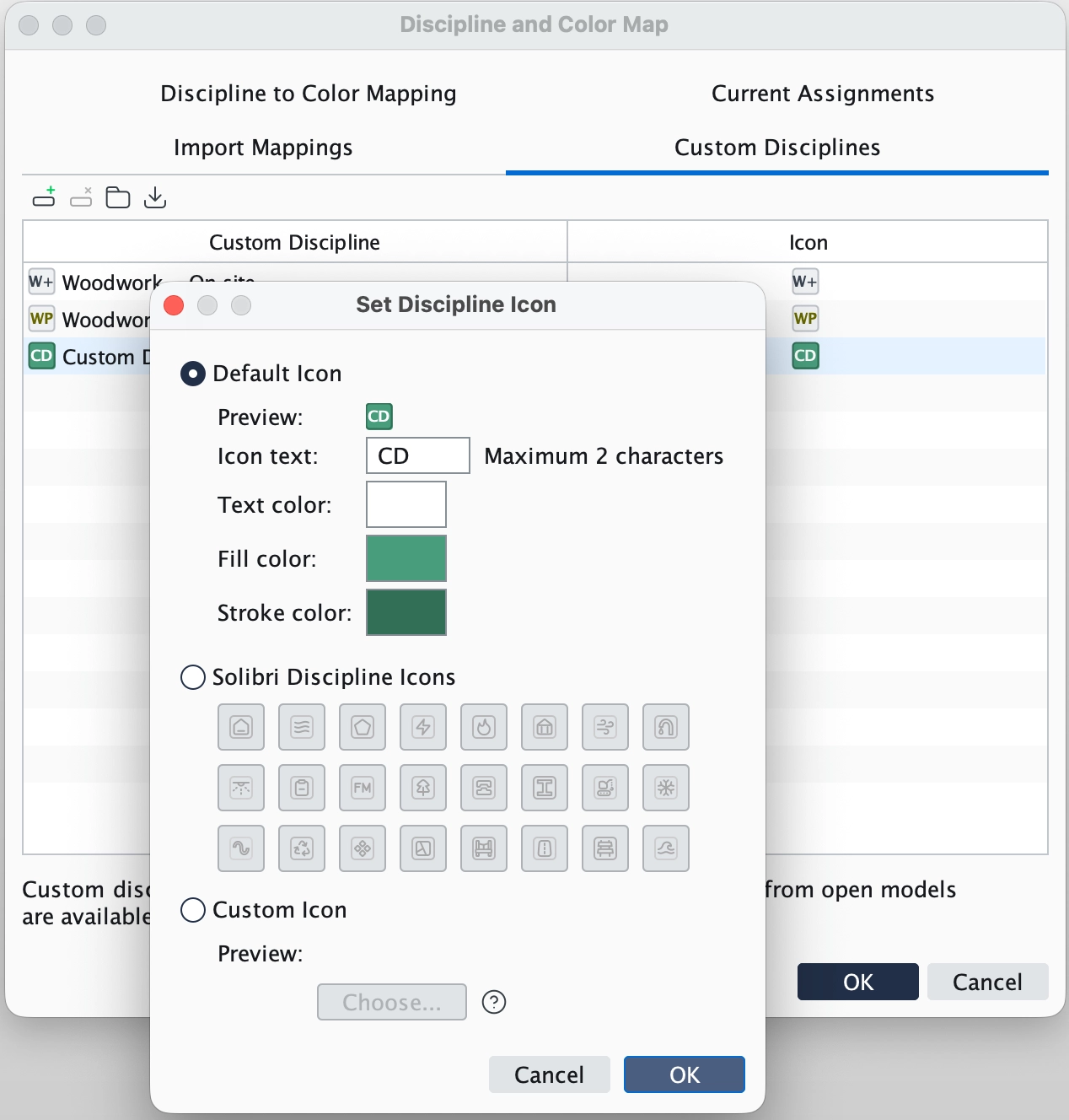
Solibri now supports custom disciplines. You can create, edit, and use custom discipline categories in your Solibri projects. Each custom discipline can have its own name and icon, making it easier to organize and filter project content according to your team’s workflows.
IfcAlignment for infrastructure workflows
Solibri now includes improved support for infrastructure workflows.
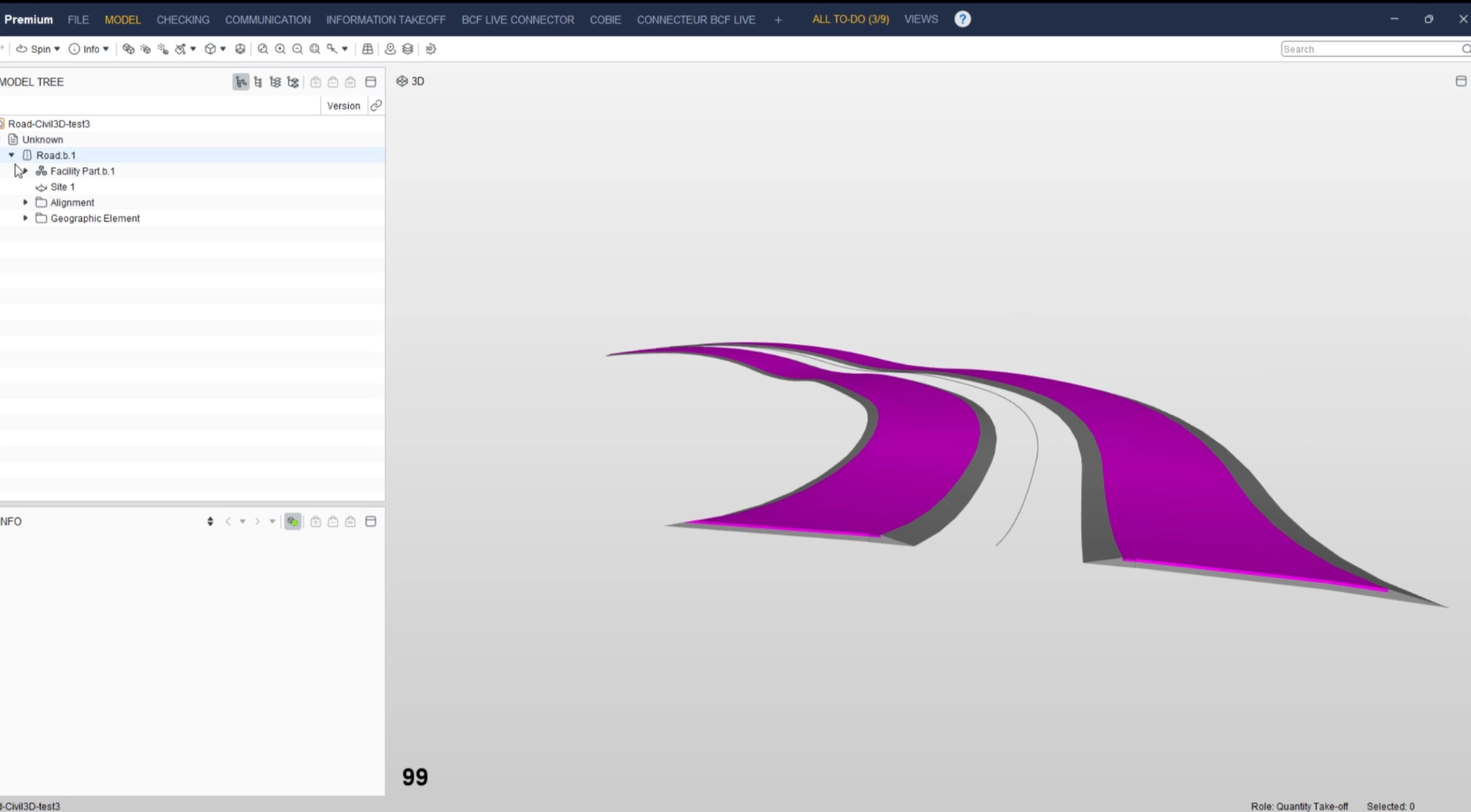
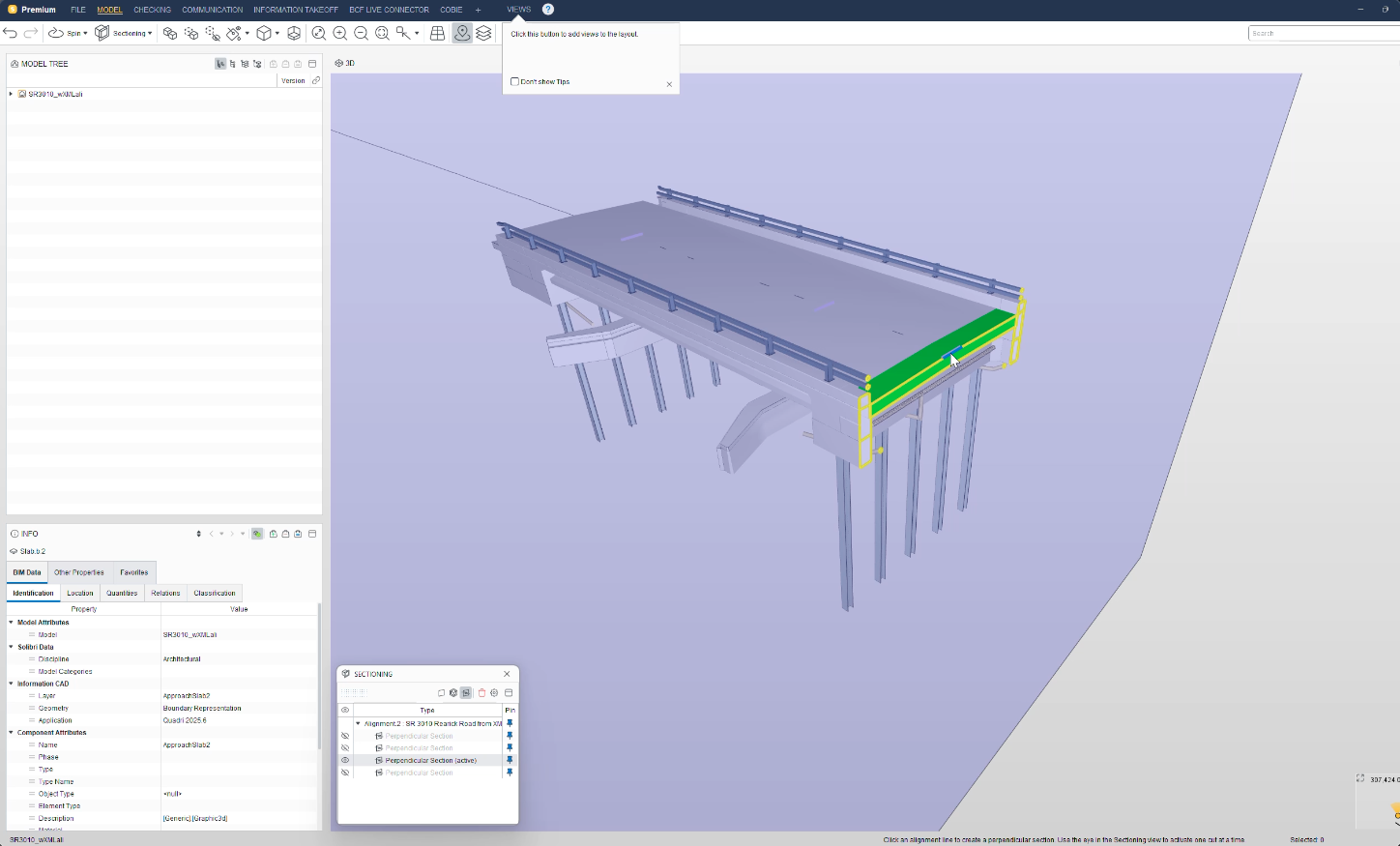
IfcAlignment support has been improved so alignment data can be represented and visualized for infrastructure projects. Alignment lines are now visible in the 3D view and can be selected for measurements and sections. New sectioning tools are also available to create individual sections and automatically generate sections along alignment lines.
In addition, the Model Locations dialog now includes an option to suppress repeated automatic warnings for infrastructure projects where large model extents are expected. Users can still open the dialog manually when needed.
Result Customization
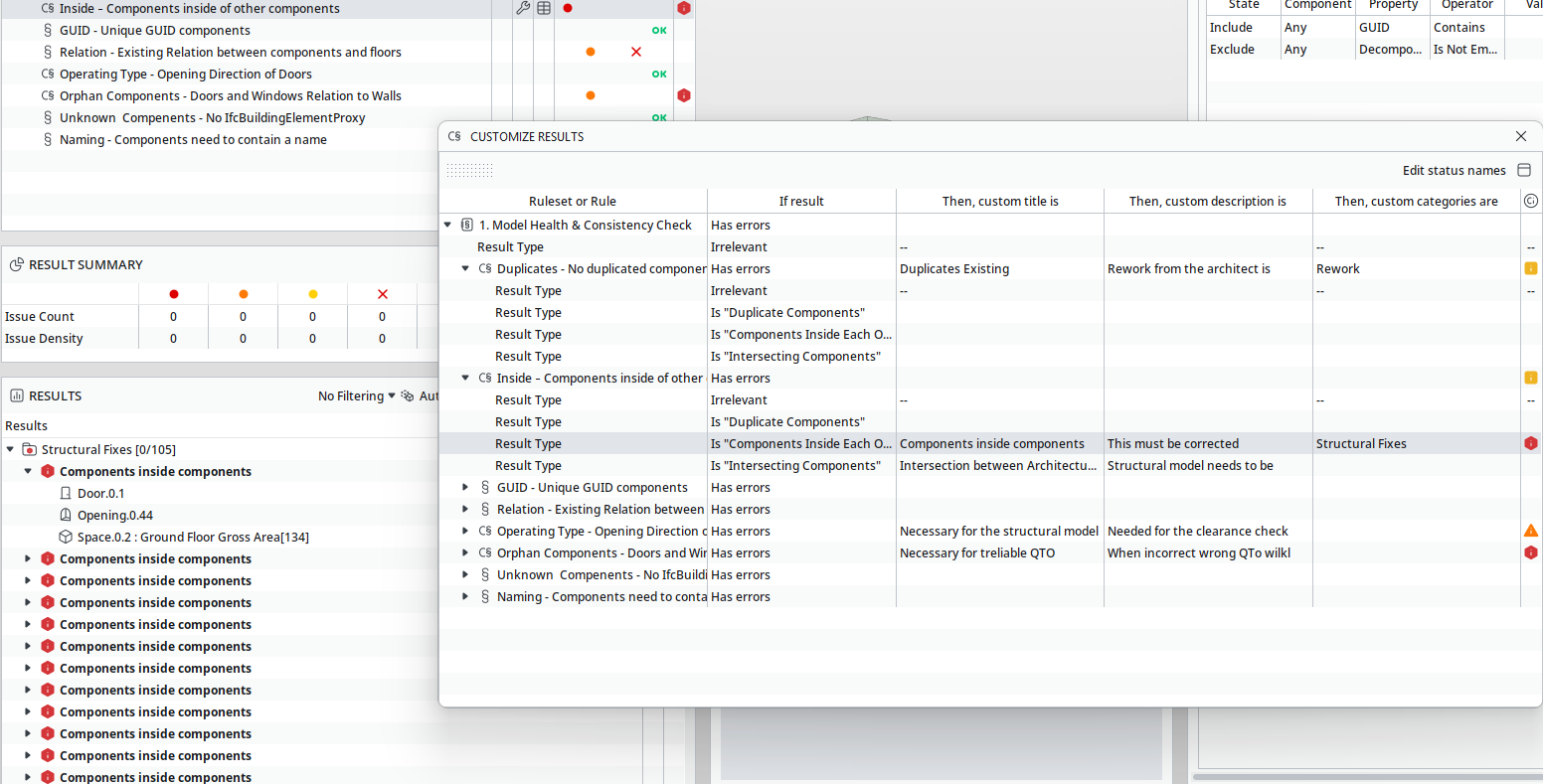
Rules can now declare result types, and you can customize titles, descriptions, categories, and severity for specific result types on a ruleset or folder.
- Rules declare the result types they produce. Undeclared results use a generic result type.
- Define a custom title, description, category, and status, such as info, alert, or error, per result type.
Right-click a ruleset folder or rule in the checking tree and select Show customizations to add, edit, or remove customizations.
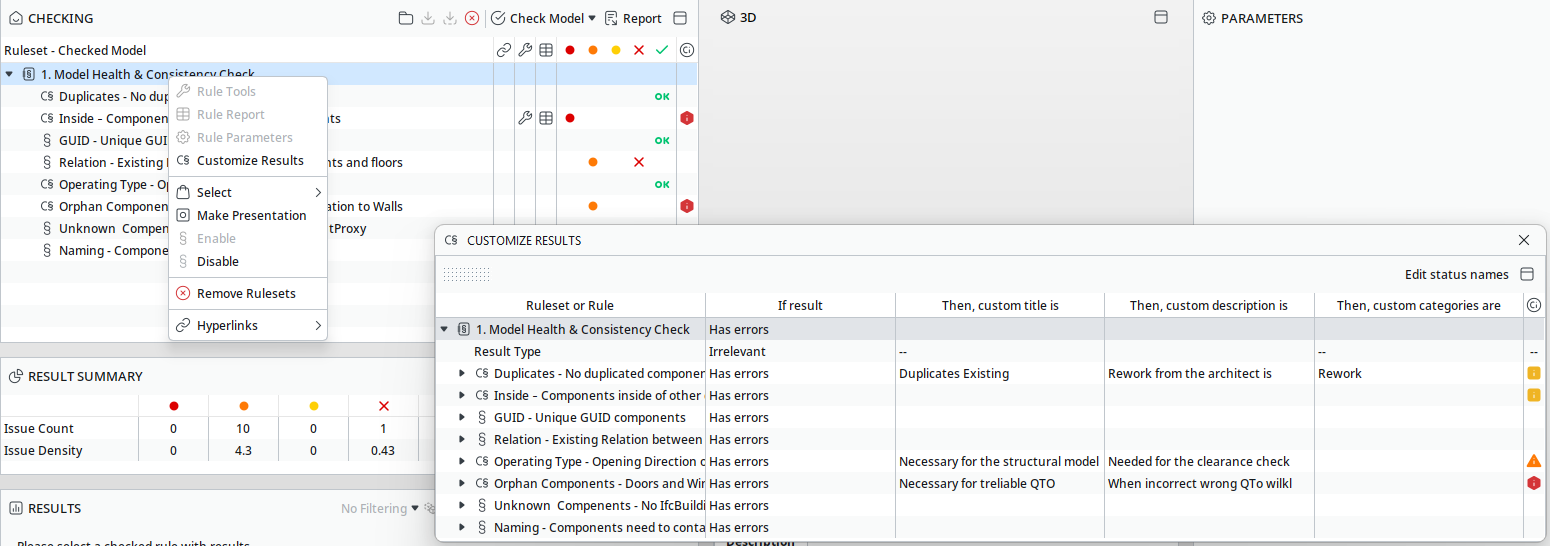
- Customizations apply to current results without re-running the check when possible.
Customized results are visually distinguishable in the results tree. The original rule-defined title and description remain accessible.
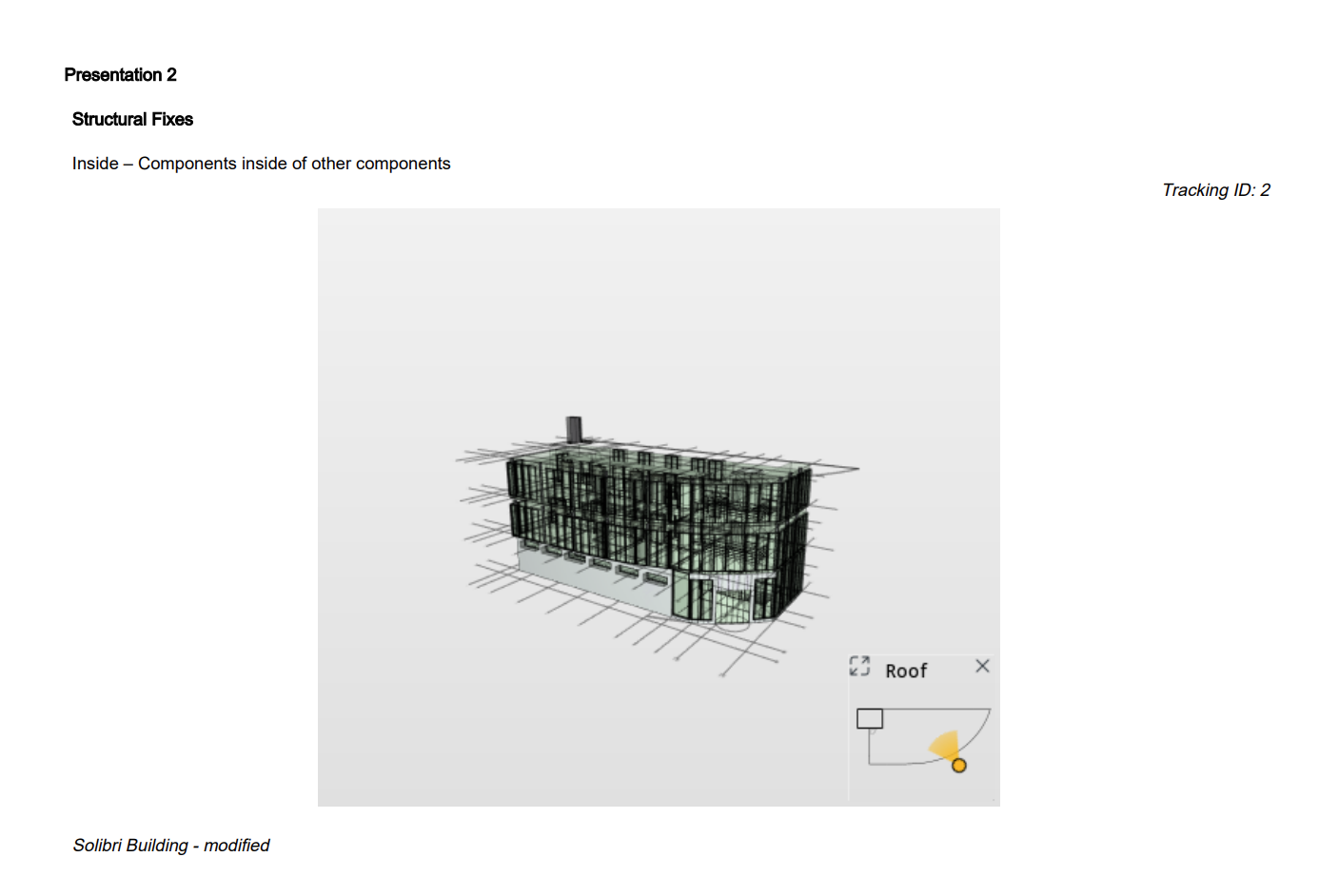
Exports, including BCF, Excel, PDF, and others, use customized values as the primary title and description.
- Older rulesets and .cset files open and behave as before when no customizations are defined
Expanded localization
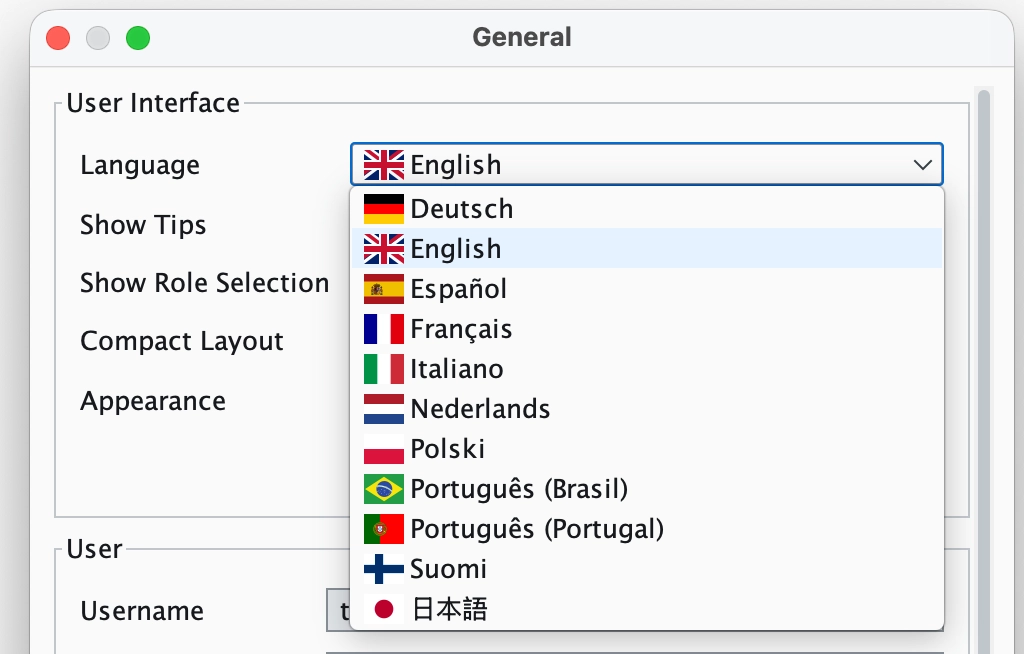
This release expands desktop localization coverage across multiple languages, including Dutch, Spanish, Portuguese, Italian, Polish, and Brazilian Portuguese. Language handling has also been improved so localized resources and Excel templates are easier to maintain consistently.
In-app Notifications
Notification settings now let you enable or disable the following notification types:
- Important service messages
- Product updates
- Tutorials
- Application jobs and task notifications
-
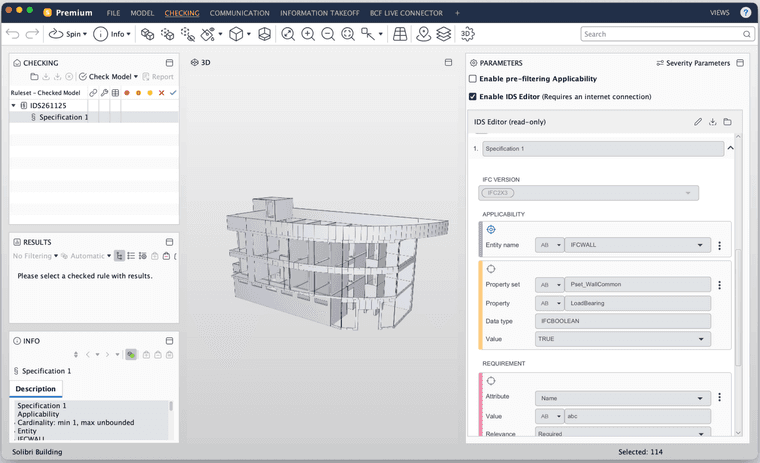
IDS-Rule #244 improvements
The IDS rule includes the following improvements:
- Redesigned IDS rule parameter panel with improved layout and resizing behavior
- Dark mode support in the embedded IDS rule UI
- Backward compatibility when opening IDS files from different Solibri versions, such as 25.12.0
- Enumeration facet support for integer and decimal property restrictions
- 3D view interaction between the IDS rule panel and the Solibri model view
- Offline fallback when the embedded web view cannot load, so you can still work with your IDS file
- Option to overwrite an existing IDS file with the latest changes from the editor
- Filtered components from other federated models are correctly excluded from results
In addition, users can now choose how multi-specification IDS files are imported: either split into separate rules by specification or kept as one combined rule. This makes IDS import more flexible while keeping single-specification imports simple and unchanged.
Use case: Author an IDS specification in the IDS Editor and run a check to verify that doors, walls, and other components carry the properties and attributes your project requires before coordination or handover.
Rule #207 and Rule #210: Handrail continuity improvements
Handrail continuity checks now follow the configured handrail existence requirement. Depending on the rule settings, handrail continuity can require both sides, at least one side, or follow the existing “not required” behavior.
Rule #208: Accessible Door improvements
- You can now specify a clearance offset measured from the door panel surface instead of the door opening edge
- Handle-side clearance checks can start from the panel surface, giving more accurate results for doors where the handle position affects the required maneuvering space
- Handle-clearance checks for double-leaf doors are more accurate:
- When one panel is fixed, handle clearance is checked only on the non-fixed panel.
- When panels have different width ratios and the larger panel has a PanelWidth ratio ≥ 0.6, handle clearance is checked only on the larger panel.
Use case: When checking door clearance requirements, configure the offset from the panel surface so handle clearance is measured from the correct reference point, especially for doors with inset or offset handles.
Rule #246: Configurable tolerance
Rule 246 now includes a configurable tolerance for cuboid and cylinder fitting. This gives users more control over acceptable deviations in model proximity and fitting checks.
Rule #248: Accessible Area Around Objects Rule
This rule checks that the required clear space around selected components remains unobstructed, helping teams validate accessibility, usability, safety, and compliance requirements for objects such as toilets, washbasins, showers, doors, and equipment.
What has changed:
- Added configurable barely touching tolerance (replaces hardcoded defaults)
- Added minimum tolerance limit
- Improved front and back side detection for objects with ambiguous footprints
Use case: When checking door clearance requirements, configure the offset from the panel surface so handle clearance is measured from the correct reference point, especially for doors with inset or offset handles.
Learn more about the Accessible Area around Objects Rule.
-
Integrations
Autodesk Forma: The custom Forma Issues integration now supports pushpins bidirectionally. This means Solibri issue locations and camera settings are reflected in Forma, and Forma issue locations and camera settings are reflected in Solibri. Because the connection is custom and not BCF compliant, there are setup considerations and some minor limitations. See this guide for more information.
ACCA: Solibri now supports issue management with ACCA’s usBIM platform, enabling teams to manage BIM issues in an openBIM workflow. ACCA’s issue management tools support BCF-based coordination, helping teams turn model issues into trackable activities that can be assigned, reviewed, and followed until resolution.
KISS-BIM: Solibri now supports issue management with KISS-BIM, a CDE platform with BCF ticket workflows for BIM coordination. The integration helps teams manage model-based issues, assign responsibilities, track changes, and connect issue workflows with project documents, models, and checking processes.
Improved sectioning
We’ve introduced a new Sections view which allows you to create, view, pin and activate or deactivate individual sections. In addition to the current sectioning tools, you can also now create sandwich sections, perpendicular sections, and automatically generate perpendicular sections at a specified distance, which is particularly beneficial in conjunction with IfcAlignments.
Performance
We’ve made further improvements to Solibri startup time, 3D performance, and relations as well:
- Improved 3D text and annotation rendering performance in Communication and BCF Live workflows.
- Improved sectioning performance when moving sections in large models.
- Information Takeoff performance has been improved for first-time calculations that include quantity property columns, reducing delays in large models.
- Improved geometry normal creation for complex components.
- Improved triangulation handling for problematic polygons.
- Improved footprint hole extraction from component geometry.
- Improved grid label readability near section cuts.
Sign-in and authentication
- Proxy settings can now be turned off correctly after a failed browser-based login attempt with an invalid proxy configuration
- Improved license certificate handling to avoid startup issues in affected network environments
- Support added for three different ports for external browser login.
- Fallback to re-login implemented if any licensing error occurs.
-
We’ve improved security to comply with the following vulnerability and hardening requirements:
- Hardened XML parsing against XXE vulnerabilities in BCF and related XML import paths.
- Addressed insecure XML parser findings in Python scripts and localization tooling.
- Improved password digest comparisons to avoid timing-sensitive comparisons.
- Verified Jackson Core resource allocation vulnerability exposure and dependency resolution.
- Updated Spring Boot starter dependencies to address CVE-2026-40974.
- Updated the installer JDK to 21.0.11 for current security fixes.
-
Rules and Checking
- Fixed IDS numeric enumeration rule errors.
- Fixed incorrect results when an IDS entity requirement specifies PredefinedType = USERDEFINED — components with USERDEFINED predefined type now pass correctly
- Fixed Clash Detection Matrix visualizations appearing at incorrect locations.
- Fixed duplicate clash entries by implementing a unique ClashKey and extending it with discipline context to differentiate clashes across row/column combinations.
- Fixed checked status being lost after checking when selecting rules or changing units.
- Fixed result visualizations with Component Inside Component Rule #234 appearing bad in the 3D view when far from origin.
- Fixed an issue with Rule #222 where checking could fail when door polygon data was undefined.
- Fixed structured JSON ruleset schema validation with Rule #230 so invalid values are rejected correctly.
Information Takeoff
- Filter selection buttons are now enabled by default.
- ITO reports can now be created when the ITO name contains characters that are invalid in Excel sheet names, such as colons.
- JavaScript code editor row headers in ITO settings are now readable in dark mode.
Communication
- Fixed author attribution for issues created from checking results.
- Fixed the missing Report toolbar label in the Presentation view.
- Fixed component loss when importing issues created from multiple checking results into BCF Live.
- Fixed an issue which caused some Forma issues to become unpublished in Forma.
- Resolved an issue where Forma assignee lists were not populated in Solibri during initial synchronization.
UI and Integrations
- Fixed Documents API access for Starter tier users.
- Improved repeated Model Locations dialog behavior for infrastructure projects.
- Fixed several localization issues across Japanese, French, and Brazilian Portuguese resources.
Others
- Classification import and export now provides clearer error messaging when working with Excel files. This helps users distinguish file access problems, such as an open or unavailable file, from file format compatibility issues.
Cloud updates
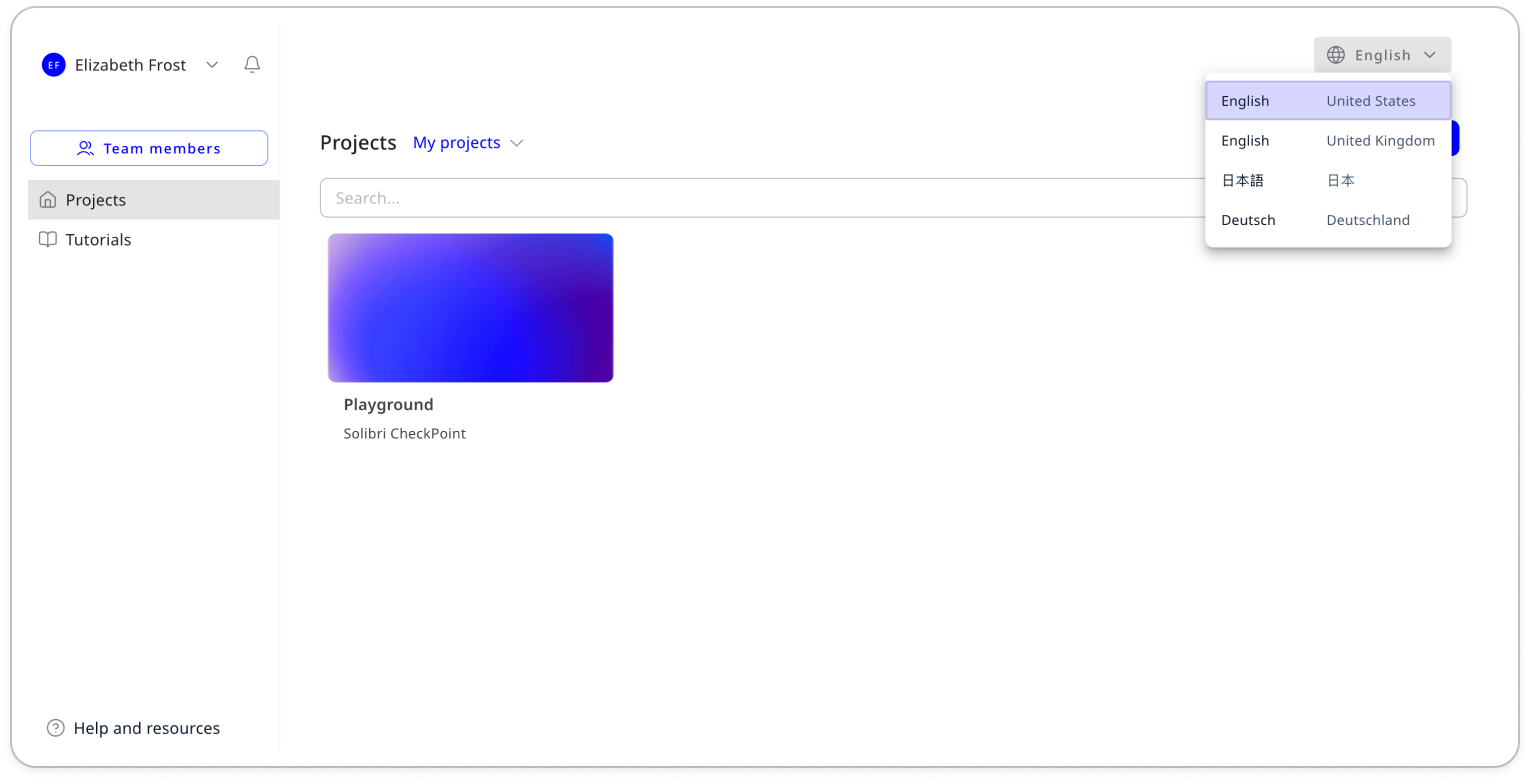
The Solibri cloud interface is now available in German, Japanese, English (UK), and English (US). You can switch between supported languages using the language selector.
-
The Solibri cloud interface is now available in German, Japanese, English (UK), and English (US). You can switch between supported languages using the language selector.
-
- Switching projects while the data viewer is open can cause errors.
- Moving folders from your personal library to your project library is not possible when items inside the folder are being used in either a data view or rule.
- When model upload gets interrupted, reloading the page will result in that model being stuck in a loading loop.
- Not all items in a folder may be added to the workspace when adding resources from a company library
Release content availability across products and plans
After the launch of Solibri on April 13, the new features are only available in the new products and plans (Starter, Essential, Advanced, Premium), while updates to existing features, performance, and security improvements are available for legacy products as well.
| Feature | Products & Plans |
| AI Assistant (Beta) | Premium |
| Point Cloud validation | Premium, Enterprise |
| Custom Disciplines | All products and subscriptions |
| Result Customization | Advanced, Premium, Enterprise |
| IfcAlignment support for infrastructure projects | All products and subscriptions |
| New sectioning tools for IfcAlignment and infrastructure projects | All products and subscriptions |
| IDS-Rule #244 | Advanced, Premium, Office, Enterprise |
| Rule #208: Accessible Door | Advanced, Premium, Office, Enterprise |
| Accessible Area Around Objects Rule (#248) | Advanced, Premium, Office, Enterprise |
| Autodesk Forma Issues integration | Advanced, Premium, Site, Office, Enterprise |
| Performance and security improvements | All products and subscriptions |
| In-app Notifications | All products and subscriptions |
| Bug fixes | All products and subscriptions |